
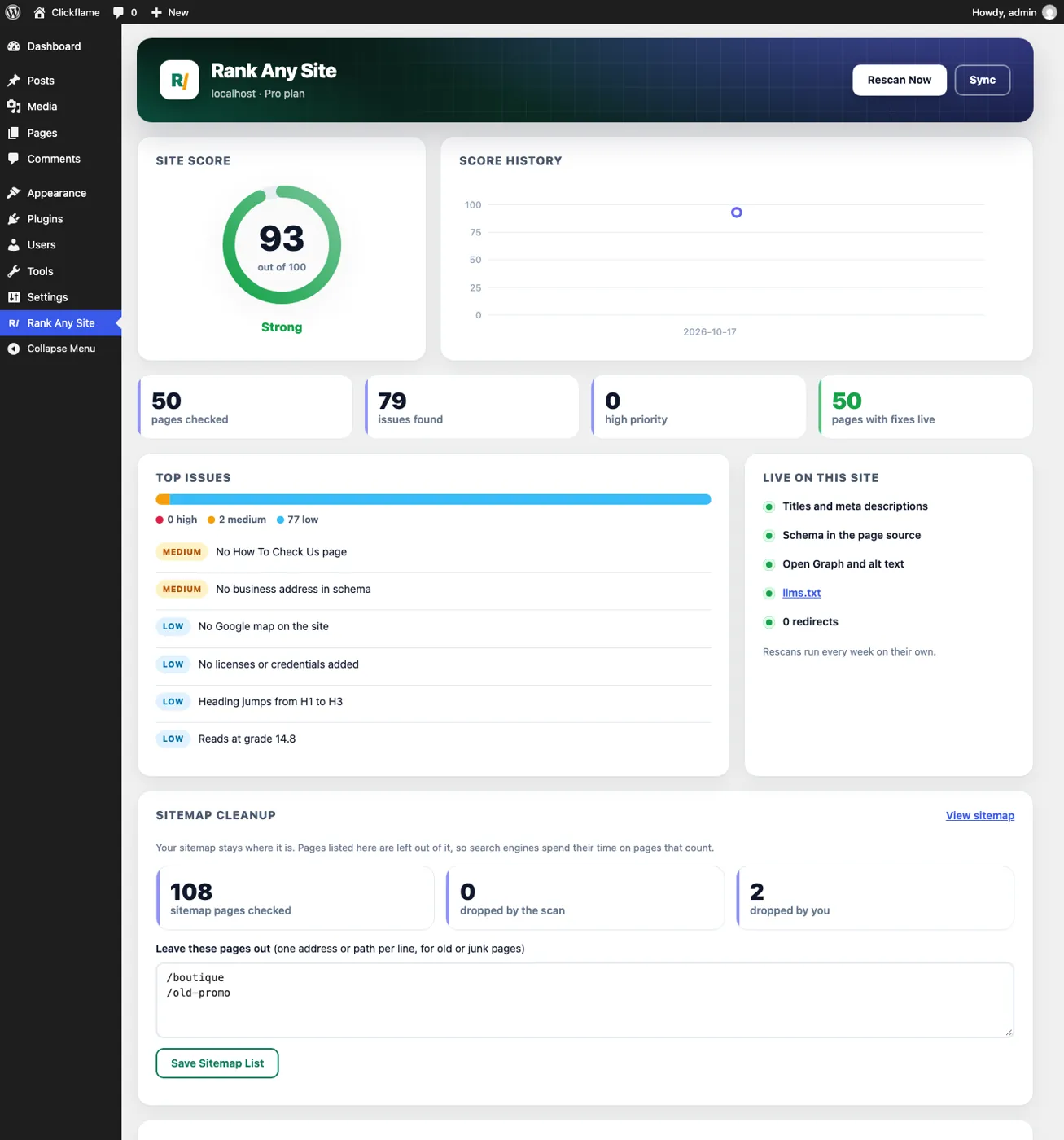
76 out of 100. That was the median score when I ran six WordPress business sites through Rank Any Site on October 28, 2026. Most showed signs of an SEO plugin. Every one still had pages to fix. And not one had an llms.txt file for AI tools.
Pick Rank Any Site as a preferred source on Google
Scores updated October 2026
Up Front
A WordPress SEO plugin should check the page your visitors get, not just the boxes you typed in. Those two drift apart all the time. A theme prints a second description. A page builder drops its own canonical. A robots.txt file quietly blocks a crawler. Rank Any Site for WordPress reads your own published page, tells you what it really serves, and fixes it in one click. It's free to use with no account. If you're thinking about switching plugins, save every page's head first and compare after. That's how we switched two client sites on October 18, 2026 and every page matched.
- Six real WordPress sites, 77 pages, nothing installed. Scores ran from 53 to 81, with a median of 76.
- One homepage printed its canonical tag twice. Another had no description and no canonical at all.
- None of the six served an llms.txt file. One blocked OpenAI's crawlers in robots.txt.
- WordPress builds pages on the server, so plugin fixes land in the source that AI crawlers read.
- Four WordPress sites run Rank Any Site daily. Their median score is 84.
What Six WordPress Sites Really Served
WordPress runs 39.5% of all websites, says W3Techs. Among sites where the system is known, it's 58.3%. So if you own a small business site, odds are good it's WordPress. Most of the sites I watch every day are hand built. I wanted fresh numbers from sites I don't run.
So I took real plumbers, dentists and a roofer from Google's local results. I checked each homepage for WordPress first. Then I ran the free scan on six of them, up to 13 pages each. I won't name them. They never asked to be in a post.
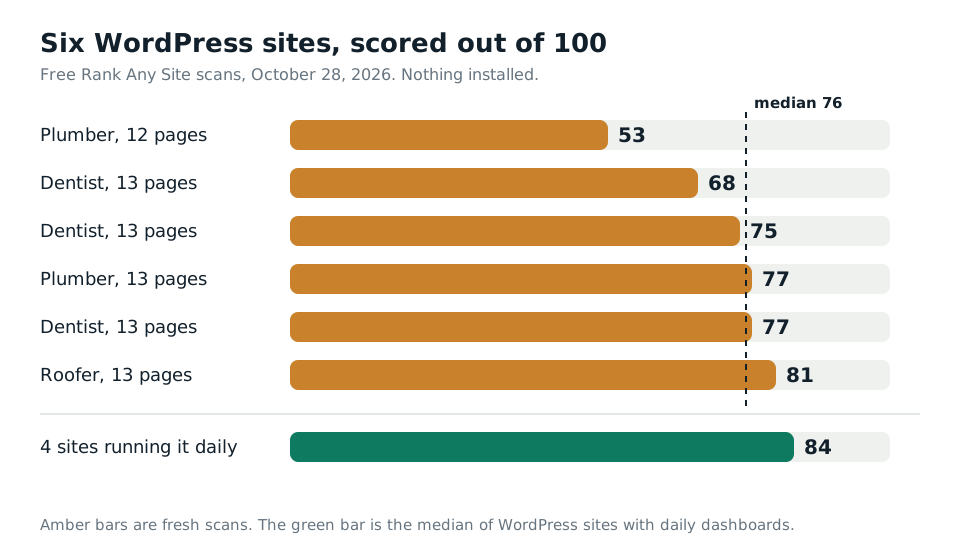
The scan found 70 high priority issues across the six. That's on top of 130 medium and 256 low ones. The worst site had 26 high issues on 12 pages. The best had one.
| What we found | Sites |
|---|---|
| No llms.txt file | 6 of 6 |
| No licenses or credentials the scan could read | 6 of 6 |
| No page that helps people check the business is real | 5 of 6 |
| No link to the Google Business Profile | 5 of 6 |
| Canonical tag printed twice on the homepage | 1 of 6 |
| No description and no canonical on the homepage | 1 of 6 |
| OpenAI crawlers blocked in robots.txt | 1 of 6 |
The tool wrote fixes for those 77 pages. It suggested 73 new titles, 33 meta descriptions and 74 schema blocks. The titles count is high on purpose. Our house rule puts the service, the city and the phone in the title. A title missing any of those gets a new one.
The homepages were heavy, too. The HTML alone ran from 76 KB to 272 KB, before a single image or script loaded.
Your Editor Isn't Your Page
Most SEO plugins grade what you typed into the editor. You write a title. It turns green. You move on. But Google doesn't read your editor. It reads the page your server sends.
Those two aren't always the same. Your theme might print its own description. A page builder might write one inside the page body. A second plugin might add a canonical. The editor still shows green, and the live page has two of everything.
That's not a made up case. One of the six sites printed the same canonical tag twice on its homepage. Google's own docs say not to send mixed canonical signals for one page. Another homepage had no meta description and no canonical at all. Google says it may build the snippet from your page text when the description doesn't fit. You'd rather pick the words yourself.
Rank Any Site works the other way around. One click on any post and your site fetches its own published page. It reads it the way a crawler does. Then it tells you in plain words what it found. Two descriptions. A noindex header from the server. A canonical that points somewhere else. A robots.txt that blocks ChatGPT. Most findings come with a Fix button. Fix All handles a whole page after you confirm.
The check runs on your own server. Nothing goes to us unless you click the free score or add a license key.
WordPress Is a Good Place for AI Fixes
This is where WordPress beats most website builders. On a builder, our fixes often go in through a JavaScript snippet. Google runs that. Most AI crawlers don't. Vercel found in December 2024 that none of the big AI crawlers it measured ran JavaScript, GPTBot and ClaudeBot included.
WordPress is different. It builds each page in PHP on the server. So the plugin puts every fix into the page before it's sent. The title, the description, the schema and the alt text are all in the raw source. Google sees them. So does every AI crawler that reads plain HTML.
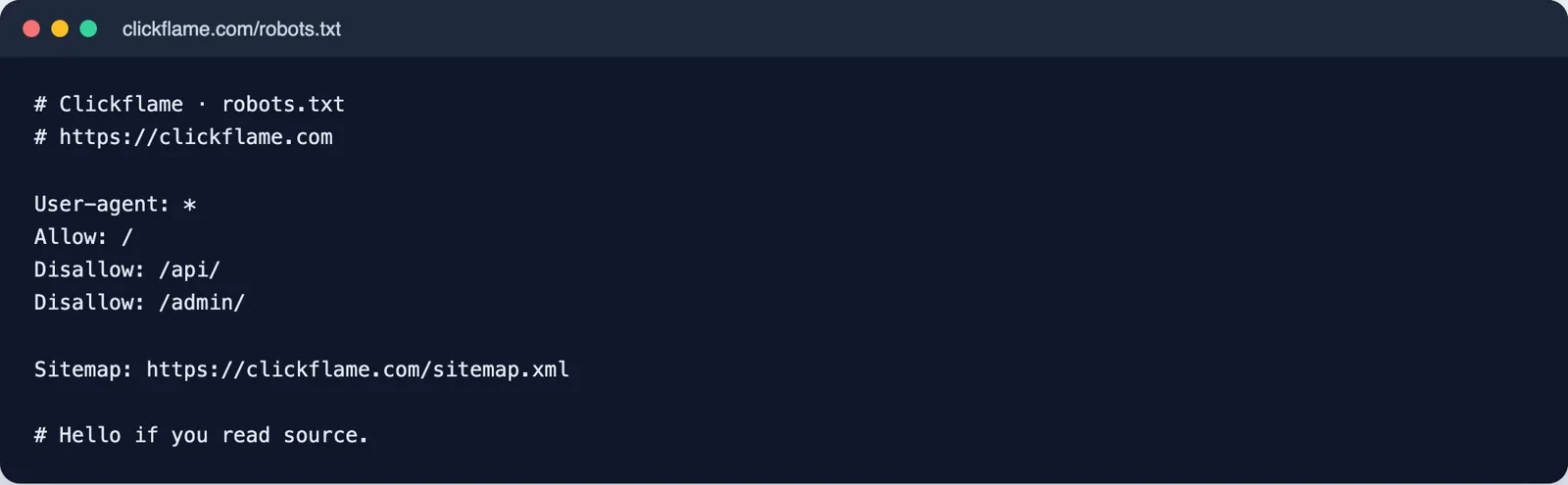
Then there's robots.txt. One of the six sites blocked GPTBot, ChatGPT-User and a few other AI bots. That may be a choice the owner made. But OpenAI's docs say each of its crawlers is set on its own. GPTBot is for training. OAI-SearchBot is the one that puts you in ChatGPT search answers. Blocking the wrong one can keep you out of answers you wanted to be in. The live check tells you when robots.txt blocks an AI crawler, and a site fix can let them back in.
The last piece is llms.txt. It's a short plain text file at the root of your site that tells AI tools who you are. The format comes from llmstxt.org. None of the six sites had one. On WordPress you don't need to upload anything. The plugin serves the file from the facts you enter, like your licenses, insurance, year founded, phone and service areas. Empty fields print nothing. It never makes up a fact about your business.
How to Switch Without Losing a Tag
Switching SEO plugins scares people, and it should. A bad switch can drop every description on your site in one afternoon. You won't see it in the editor. You'll see it weeks later in Search Console.
On October 18, 2026, we moved two client sites off an older head tag plugin and onto Rank Any Site. One had 26 pages. Before we touched anything, we saved what every page served in its head. That meant the title, description, canonical, robots, verification tags, analytics and schema. After the switch we saved it again and compared. Every page matched, schema included.
Follow the same steps on your site.
- Save every page's head before you change anything. A crawler or a simple script can do it from your sitemap.
- Install Rank Any Site beside your current plugin. Don't turn the old one off yet.
- Import what you can. The plugin pulls in analytics, verification codes and llms.txt from the older tag plugin we replaced.
- Turn on the site fixes that match how your old plugin wrote titles and descriptions.
- Save every page's head again and compare it to the first save.
- Only when they match, deactivate the old plugin. Then compare one more time.
You don't have to switch at all, though. The plugin is built to run beside the big SEO plugins. When one of them is active, your values go into its tags instead of printing twice. With a plan, it only adds a description where a page has none. It never repeats a schema type a page already has.
What's Free and What a Plan Adds
The plugin is free to download and use with no account. You install it from a zip in Plugins, Add New, Upload Plugin. A paid plan adds the service side.
| Part | Free plugin | With a plan |
|---|---|---|
| Live page check and Fix buttons | Yes | Yes |
| Your facts, schema and llms.txt | Yes | Yes |
| Sitemap cleanup and speed fixes | Yes | Yes |
| Page caching | Yes | Yes |
| Titles and descriptions written from each page | No | Yes |
| Redirects for old pages that now 404 | No | Yes |
| Fresh scan every week with score history | No | Yes |
| Directory listings checked for your phone and place | List only | Yes |
Plans start at $5 for the first month. After that Starter is $19 a month for one site. Pro is $49 a month for five sites. Agency is $129 a month for 25. You can cancel from your account page. The pricing page has the full list.
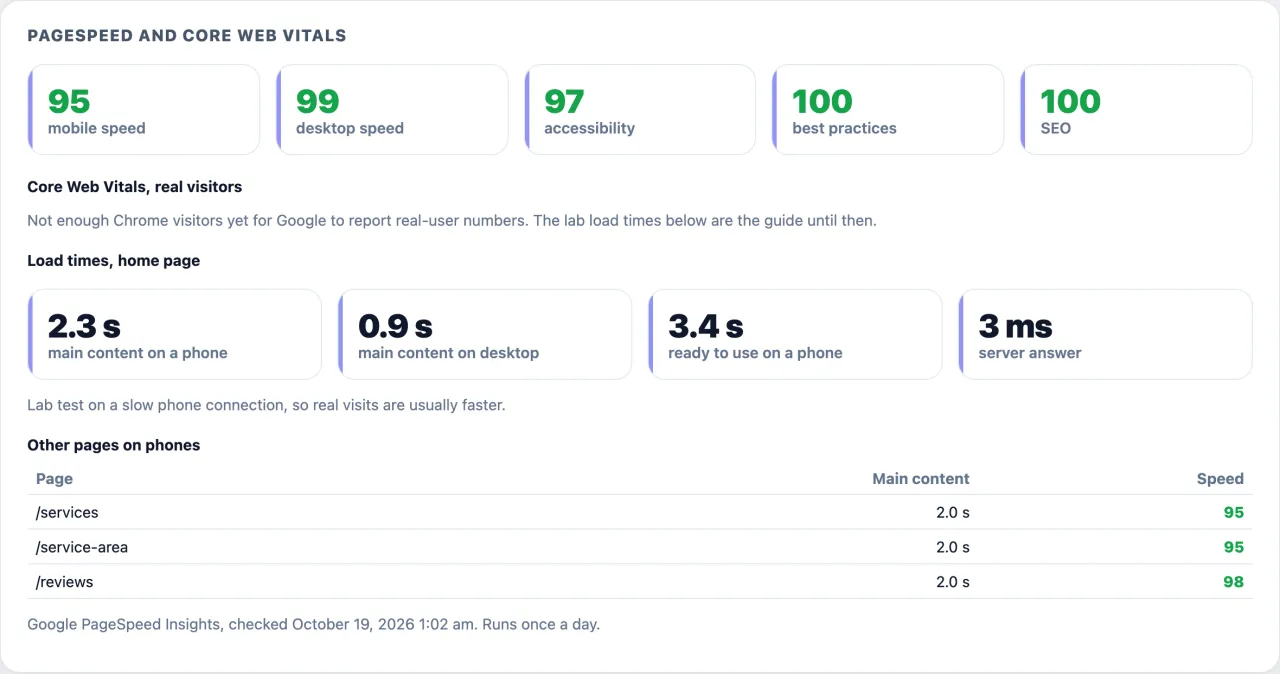
Speed is the one thing a plugin can't fully fix. The four WordPress sites I watch every day have a median mobile PageSpeed score of 85.5. The hand built sites sit at 98. That gap is mostly theme weight, not SEO. The plugin helps where it can. It loads the main image first, pushes analytics until after the page, drops the emoji script and can cache pages. Then it tells you what's still slow.
Want to see your own number first? Run the free scan on your site. It reads your live pages, scores them out of 100 and names the plugin as your install. You can also see how it works, the October test of 61 sites, or how it runs on seven other kinds of website.
Answers to the Usual Questions
Is the Rank Any Site WordPress plugin free?
Yes. The plugin is free to download and use with no account. That covers the live page check, the one click fixes, your facts and schema, llms.txt, sitemap cleanup, speed fixes and page caching. A paid plan adds weekly rescans and fixes written from your own pages, at $5 for the first month.
Can I run two SEO plugins on WordPress at the same time?
You can, but two plugins that both print tags often leave a page with two descriptions or two canonicals. Rank Any Site is built to sit beside the big SEO plugins. When one is active, the values you set are passed into that plugin's own tags so nothing prints twice.
Will switching SEO plugins hurt my rankings?
Not if every page serves the same title, description, canonical and schema after the switch as before. Save each page's head first, switch, then compare. On the two sites we switched on October 18, 2026, every page matched.
Does a WordPress SEO plugin help with ChatGPT and AI search?
It can, because WordPress builds the page on the server. Fixes from a plugin are in the page source, which is what AI crawlers read. Check your robots.txt too. A site that blocks OpenAI's search crawler stays out of ChatGPT search answers.
Do I need llms.txt on a WordPress site?
It helps AI tools read who you are in plain text. None of the six WordPress sites we scanned on October 28, 2026 had one. The plugin serves it from your facts, and you can paste your own version instead.
Citations
- W3Techs, Usage statistics of WordPress (October 2026)
- Google Search Central, How to specify a canonical URL
- Google Search Central, Control your snippets in search results
- OpenAI, Overview of OpenAI crawlers
- Vercel, The rise of the AI crawler (December 2024)
- llmstxt.org, The /llms.txt file
Scan your own site free
Paste your address and see your score, what is missing, and the fixes written for your platform in about a minute.