
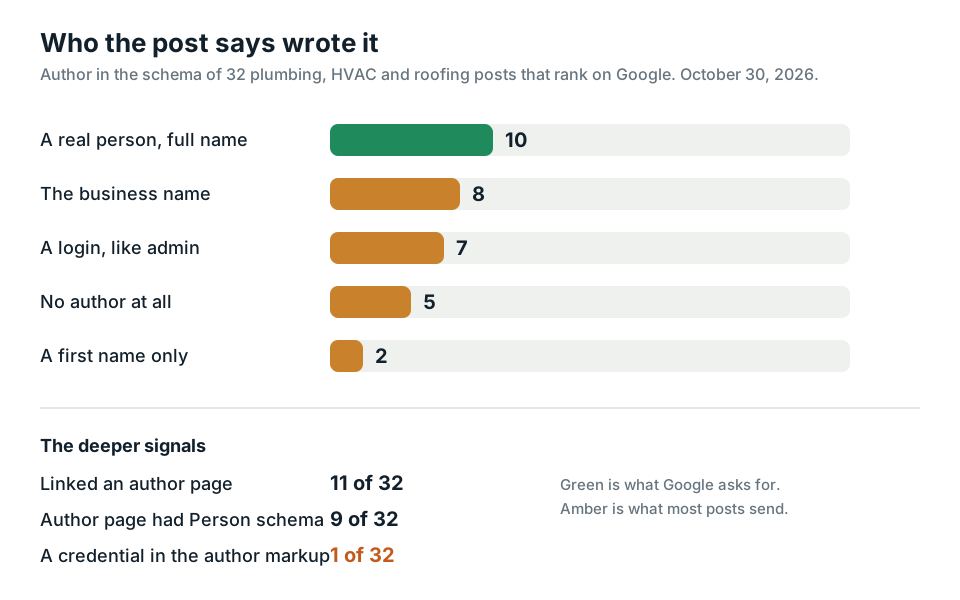
1 out of 32. That's how many ranking local business blog posts put a credential in their author markup when I checked them on October 30, 2026. Seven named a login like admin or webmaster as the author. Google's own guide on helpful content says a byline should lead to more about the person who wrote it.
Pick Rank Any Site as a preferred source on Google
Numbers updated October 2026
Up Front
Author signals are how a page shows a real person did the work. That means a byline with a full name, an author page, Person schema that links to that page, and credentials a stranger can check. Most small business blogs skip all of it. They let WordPress print the login name or the company name and move on. Google says E-E-A-T isn't a ranking factor on its own. It also says trust is the part that matters most, and that fake authors count as deception. So the fix isn't a fancier bio. It's a real name, a real page and a real license number. A free Rank Any Site scan shows which of those your site is missing, and writes the schema for the ones you fill in.
- I checked 32 plumbing, HVAC and roofing posts that rank on Google for two common homeowner questions.
- 10 named a real person with a full name. 8 named the business. 7 named a login. 5 named nobody.
- Only 11 linked to an author page, and only 1 put a job title or credential in the author markup.
- Five of those sites got a full Rank Any Site scan. None had a How To Check Us page or any credentials it could read.
- No expert on staff? Real ones sign up free to be featured authors. Never invent one.
Who 32 Ranking Posts Say Wrote Them
Author bio advice tends to stop at write in the third person and add a nice photo. It rarely counts what real sites send. So I did.
I pulled Google's top 30 results for two plain homeowner questions. One was about replacing a water heater. The other was about how long a roof lasts. I kept the posts written by local plumbing, HVAC and roofing companies and dropped the big media sites. That left 33. One blocked my script, so 32 posts from 32 different businesses made the list. I won't name any of them. They never asked to be in a post.
Then a short script read each page the way a crawler does. It looked at the author inside the page's Article or BlogPosting schema, any link to an author page, what that author page carried, and the dates.
These posts rank. They're on page one to three for questions people ask every day. And still, two out of three don't tell Google or a reader which person wrote them.
| What the post sent | Posts |
|---|---|
| A full name as the author in schema | 10 of 32 |
| The business name as the author | 8 of 32 |
| A login name, like admin, webmaster or a staff handle | 7 of 32 |
| No author at all | 5 of 32 |
| A first name only | 2 of 32 |
| A link to an author page | 11 of 32 |
| An author page with Person or ProfilePage schema | 9 of 32 |
| A job title or credential in the author markup | 1 of 32 |
| A published date in the page | 31 of 32 |
The login names are the part that stings. That's what WordPress prints when nobody fills in a display name. Three sites even marked the company up as a Person. Google reads that and gets a person called by a brand name. Dates were the one thing almost everyone got right, because the blog software adds them for free.
What Google Asks For in a Byline
Google's guide on helpful content asks three things about every page. Who made it, how and why. The who part is plain. Show who wrote it wherever a reader would expect to see it. Make the byline lead to more about that person. An author page or an About page counts.
The same guide says E-E-A-T itself isn't a specific ranking factor. It's a set of signals Google's systems look for. And trust sits at the center. That's why a byline matters. It's the easiest trust signal to fake, so it's also one of the easiest to get caught on.
Google says that too. Made up author profiles, AI headshots, fake names and false credentials are treated as deception. A page caught doing that reads as low quality. So never pay for a stock face with a made up resume. It's worse than no name at all.
Then there's the markup. Google's article structured data docs lay out a few rules for the author field.
- Use a Person for a person and an Organization for a company. Don't swap them.
- Put only the name in the name field. No job title, no "posted by".
- Use jobTitle for the title and honorificPrefix for things like Dr.
- Add a url or sameAs that points to a page about that one person.
- List each author on their own when there's more than one.
If that url points to a page on your own site, Google wants that page marked up as a ProfilePage. Its main entity is the Person, with a name, an image and sameAs links to their other profiles. The description field can carry their byline or a credential.
The Five Author Signals Worth Fixing
Do them in this order. Each one builds on the last.
- A real byline. Full first and last name, on the page, near the top. Change the display name in your blog settings so it stops printing the login.
- An author page. One page per person with a photo, the work they do, how long they've done it and links to their other profiles. Link the byline to it.
- Person schema that points home. The post's author is a Person with a url to that author page. The author page is a ProfilePage about that Person, with sameAs links out.
- Credentials you can check. A license name, number and the agency that issued it, with a link to the state lookup. Schema.org's Person has hasCredential, jobTitle and knowsAbout for this. Only 1 of the 32 posts used any of them.
- Dates. Published and updated, in the page and in the schema. Most sites already pass.
A credential nobody can check is just a claim. "Licensed and insured" in a footer tells a reader nothing. A license number with a link to the state board tells them everything in one click. AI answers work the same way. They lean on facts they can confirm somewhere else.
The markup for a post byline doesn't need to be long.
"author": {
  "@type": "Person",
  "name": "Jane Ortiz",
  "jobTitle": "Master Plumber",
  "url": "https://example.com/team/jane-ortiz"
}
That's a made up person on example.com, to show the shape. Use your own real people.
How a Rank Any Site Scan Shows What's Missing
Rank Any Site reads your live pages, not your editor. For author signals, the free scan looks at three things.
First, each post. If a page reads like an article and has no Article schema yet, the scan writes BlogPosting schema for it. When the page names its author in an author meta tag, that person becomes the author. When it doesn't, the scan falls back to your business. It never makes up a name. So a site that prints admin in its author tag gets admin, and that's your cue to fix the display name first.
Second, credentials. If your site and your facts carry no license or credential, the scan flags it. Add them in the Your Facts tab with the name, number, issuer and a lookup link. They go into your business schema as hasCredential, into your llms.txt file with a check link, and onto a How To Check Us page.
Third, that How To Check Us page. It's one page with every fact about your business and a way to check each one yourself. When a site has no page like it, the scan flags it as a medium issue and writes one for you.
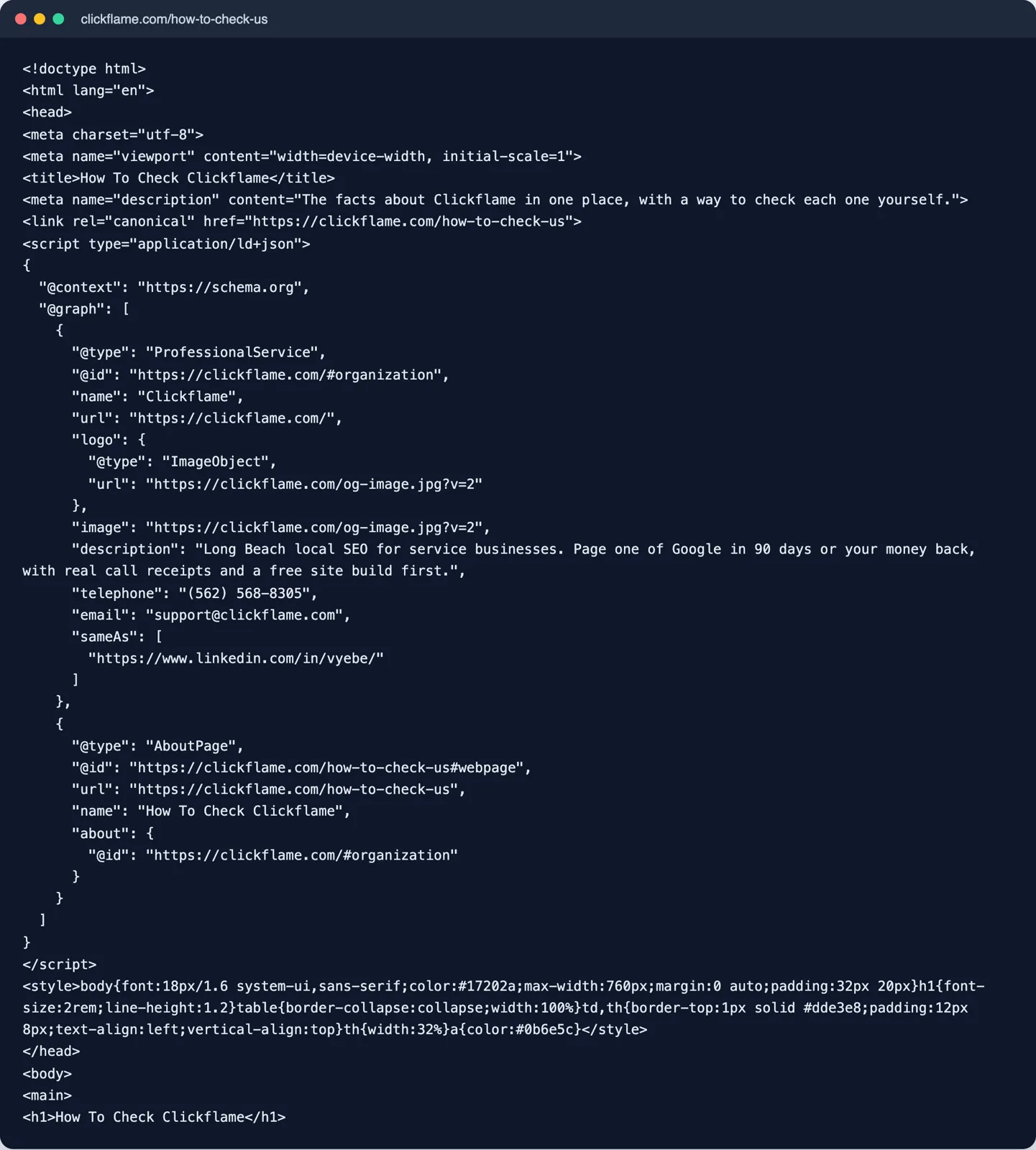
I ran the full scan on five of the 32 businesses. Two more blocked it. The five scored from 77 to 90, a median of 82. All five had no How To Check Us page. All five had no credentials the scan could read. Earlier this month the same two gaps showed up on six WordPress business sites. That's 11 local businesses in a row with no checkable license anywhere on the site, as far as a crawler could tell.
The scan stops at the business level. It won't grade every author page. For that deeper look, the free E-E-A-T audit at eeatauthors.com/audit scores 14 trust signals out of 100. Named authors on posts, author pages, Person schema with credentials, sameAs links, About and Contact pages, reviews, cited sources, dates and AI crawler access are all on the list.
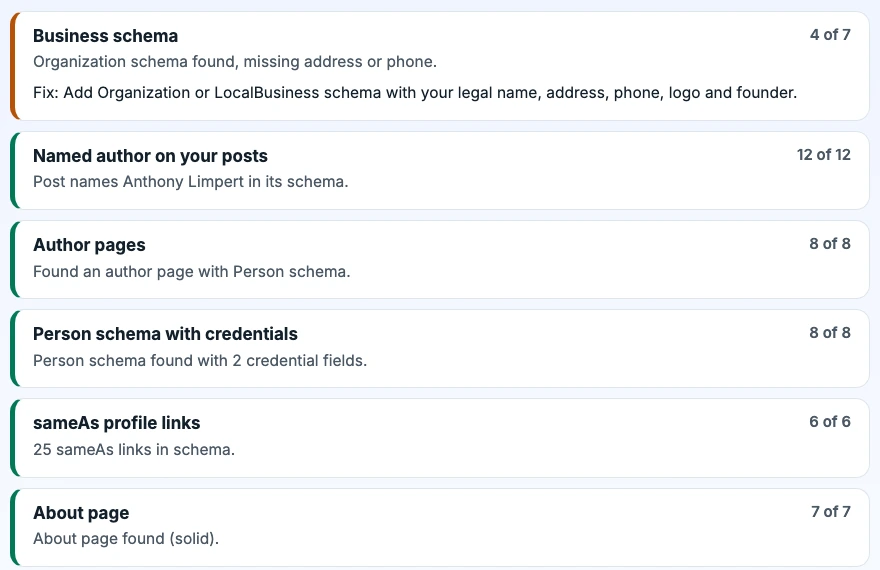
Run both and you get the full picture. Rank Any Site fixes the site side and writes the files. The audit shows how your authors read to a stranger.
No Expert on Staff? Don't Fake One
Plenty of small businesses don't have a writer. The owner is on a roof all day. The blog gets written by whoever has time, and it goes out as admin.
The fix is almost always a person you already have. The tech who did the job knows more than any writer. Put their name on it. Let them read the draft and fix what's wrong. Ask them for one line about the strangest job they ever saw. That's experience Google can't get anywhere else.
When the topic is outside what your crew does, find a real expert who agrees to it. eeatauthors.com is one place to look. Real experts sign up free to be featured authors on posts in their field. Nobody pays to join. Each person is looked up before their name goes live, and they list the topics they don't want their name on.
Whoever you use, keep it real. A full name, a real photo, a license number a reader can check. That's the whole job.
Want to see what your own site sends? Run the free scan. It reads your live pages, scores them out of 100 and lists the trust gaps with a fix for each. You can also see how it works or the October test of 61 sites.
Answers to the Usual Questions
Is E-E-A-T a ranking factor?
Not by itself. Google says E-E-A-T isn't a specific ranking factor, but that a mix of signals which point to good E-E-A-T is useful. Clear authors are one of those signals, and Google calls trust the most important part.
Do blog posts need an author name for SEO?
Google asks for a byline wherever a reader would expect one, and says the byline should lead to more about the author. A post signed by admin or by the business tells a reader nothing about who did the work.
What is author schema?
It's the author property inside Article or BlogPosting structured data. Google wants a Person with the name only in the name field, a url or sameAs that points to a page about that person, and each author listed on their own.
What should go on an author page?
A real name, a photo, the work the person has done, credentials with a way to check them, and links to their other profiles. Mark it up as a ProfilePage with a Person as its main entity.
Can I make up an author or use a pen name for credibility?
No. Google's own guidance treats made up names, AI headshots and false credentials as deception and a sign of a low quality page. Use a real person who did the work, or a real expert who agreed to review it.
Where can I find a real expert to author or review posts?
Start with people who already do the work, like your own techs or a licensed partner. eeatauthors.com lists real experts who signed up free to be featured authors, and each one is checked before their name goes on anything.
Citations
- Google Search Central, Creating helpful, reliable, people-first content
- Google Search Central, Article structured data and author markup best practices
- Google Search Central, Profile page (ProfilePage) structured data
- Schema.org, Person type
Scan your own site free
Paste your address and see your score, what is missing, and the fixes written for your platform in about a minute.