
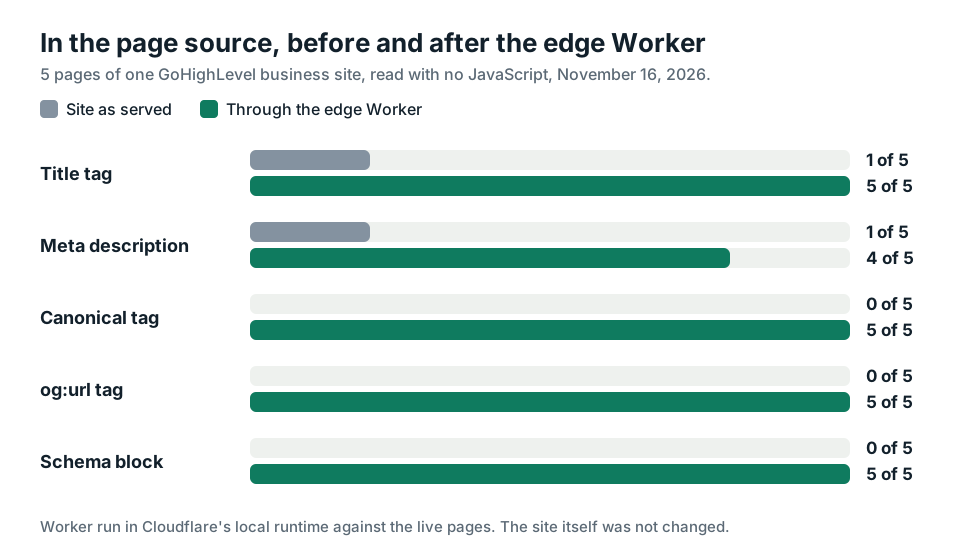
1 of 5. That's how many pages on a real business site had a title tag in the page source when I read it on November 16, 2026. Then I ran the same five pages through an edge SEO Worker. All 5 had one, and I never logged in to the site.
Pick Rank Any Site as a preferred source on Google
Test numbers updated November 2026
Up Front
Edge SEO fixes a page on its way out the door. A small Cloudflare Worker sits in front of your site and writes the missing tags into the HTML before anyone gets it. You don't need the site builder's password or a developer. On my five page test, title tags went from 1 to 5. Canonical tags and schema went from 0 to 5. Each page grew by about 3.9 KB. It didn't fix everything. Two blank files stayed blank, and I'll show you why. It also needs one thing most guides skip past. Your domain's DNS has to run through your own Cloudflare account.
- One GoHighLevel body shop site, 5 pages, read as raw HTML with no JavaScript.
- Before the Worker, 1 page had a title tag and 1 had a meta description. None had a canonical tag or schema.
- Through the Worker, 5 had a title, 4 had a description, and 5 had a canonical tag, an og:url tag and a schema block.
- The Worker served a sitemap and a trust page the site didn't have. It left an empty robots.txt and an empty llms.txt alone.
- 102 of the 149 sites we rescan every day already answer through Cloudflare.
What Edge SEO Means for a Small Site
Every page you load passes through a few computers before it reaches you. One of them is often a CDN like Cloudflare. It sits between your website and the visitor. Edge SEO puts a small program at that stop. The program reads the page as it goes by and edits it.
The idea isn't new. Dan Taylor laid it out in Search Engine Journal in December 2018. His examples were hreflang tags, redirects and security headers. The pitch was aimed at big companies whose developers take months to ship a small change.
Small sites have a different version of the same problem. Nobody is slow. Nobody is there at all. The person who built the site moved on. The login is lost. Or the builder has no box for the tag you need. The site works, so you don't want to rebuild it. You just can't get a title tag onto it.
That's the case I care about. Cloudflare's tool for the job is called HTMLRewriter. Its docs say it parses and changes HTML inside a Worker, as a stream, while the page passes through. It can set an attribute, replace what's inside a tag, or add new HTML before a closing tag. That's all an SEO fix is. Set the title. Add a description. Drop schema in before the head closes.
The Test, Five Pages Read With No JavaScript
I picked one site from the eight GoHighLevel sites I scanned last week. It's a body shop. It scored 44 out of 100. I won't name it. I don't have its login and didn't ask for one.
Every free scan writes an edge Worker file for the site it read. This one was 54,865 bytes. It carried fixes for all 5 pages the scan found, plus a sitemap, an llms.txt and a trust page.
I ran that file on my own machine in Cloudflare's local Workers runtime, pointed at the live site. Then I fetched each page two ways with a plain command line request. Once straight from the site. Once through the Worker. No browser. No JavaScript. That's how a simple crawler reads a page. Nothing on the shop's real site changed.
| In the raw page source | Site as served | Through the Worker |
|---|---|---|
| Pages with a title tag | 1 of 5 | 5 of 5 |
| Pages with a meta description | 1 of 5 | 4 of 5 |
| Pages with a canonical tag | 0 of 5 | 5 of 5 |
| Pages with an og:url tag | 0 of 5 | 5 of 5 |
| Pages with a schema block | 0 of 5 | 5 of 5 |
| Images with an alt attribute | 107 of 111 | 110 of 111 |
| /sitemap.xml | 404 | A sitemap with the pages in it |
| /how-to-check-us | 404 | A trust page |
| /robots.txt | Empty file | Still empty |
| /llms.txt | Empty file | Still empty |
The home page is the one that stuck with me. It sent 697,198 bytes of HTML and not one of them was a title tag. Through the Worker the same page came back with a title, a description, a canonical tag, four more Open Graph tags and a block of business schema. It weighed 701,392 bytes.
Across all five pages the Worker added 19,511 bytes. That's about 3.9 KB a page, or 0.7 percent. You won't feel that.
Why the Page Source Matters More Now
There's an easier way to add tags to a site you can't edit much. Paste one line of JavaScript into the builder's head code box. The script runs in the browser and adds the tags after the page loads. Rank Any Site has that too. It's called the snippet.
For Google, the snippet works. Google's own JavaScript guide says it crawls a page, puts it in a queue to render, runs the scripts, then indexes the rendered HTML. It says you can set a title and a description with JavaScript. It also says a page may wait in that queue. Usually seconds. Sometimes longer.
AI crawlers are a different animal. Vercel watched them cross its network and published the numbers in December 2024. OpenAI's crawler made 569 million fetches in a month. Anthropic's made 370 million. Neither ran JavaScript. Perplexity's didn't either. Google's Gemini and Apple's crawler did.
So a title your snippet adds is a title Google reads and ChatGPT's crawler doesn't. On a page that already has a title, that gap is small. On a page with no title at all, it's the whole page's name.
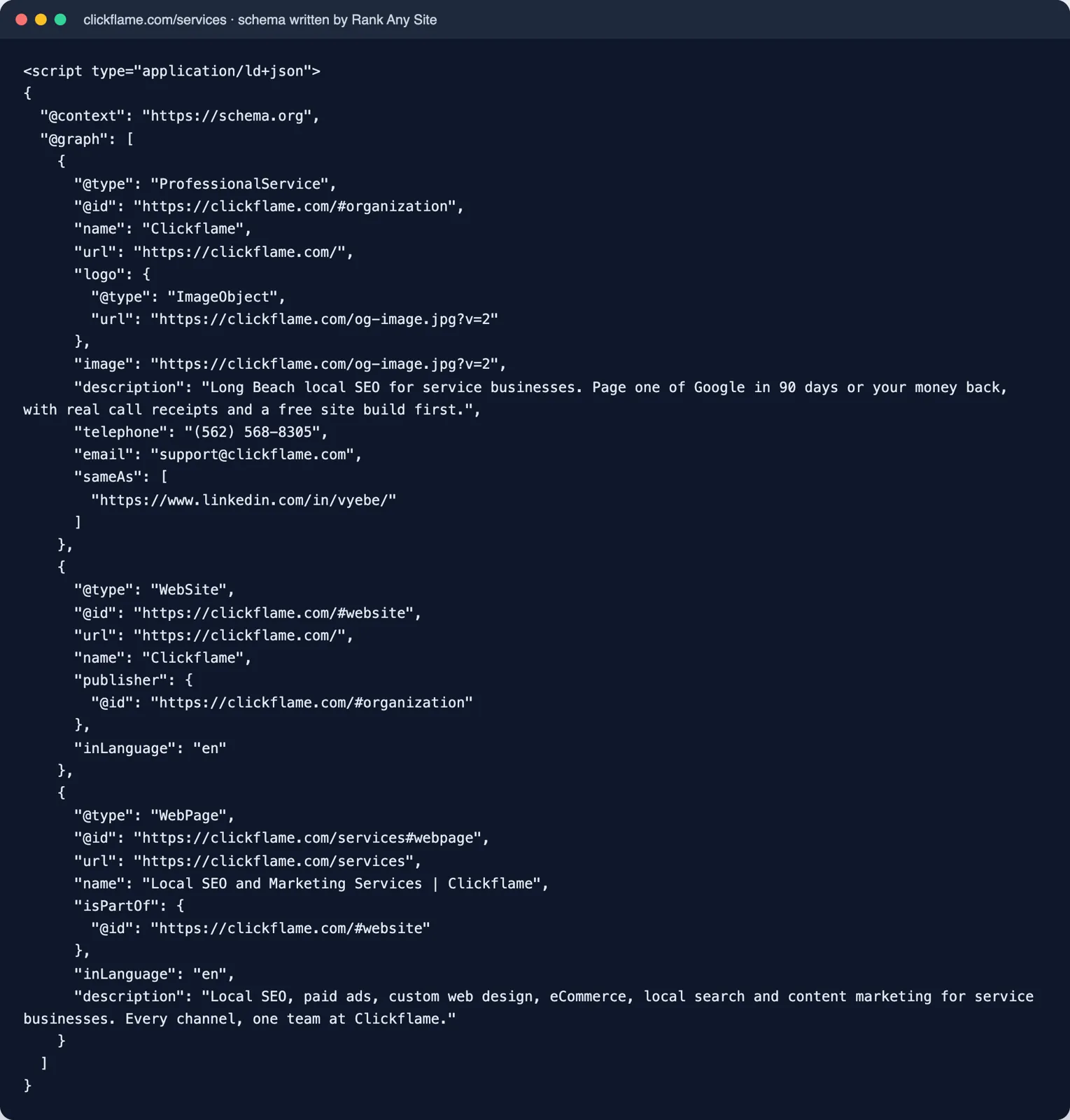
The edge Worker closes that gap. Its changes are in the HTML before it leaves Cloudflare. A crawler that never runs a script still gets them. You can check any page yourself in ten seconds.
curl -s https://yoursite.com/ | grep -i "<title"
If that prints nothing, your page source has no title tag. It doesn't matter what your browser tab says.
What the Worker Did Not Fix
Four things. I'd rather you hear them from me.
The blank files stayed blank. The site answers /robots.txt and /llms.txt with a 200 and zero bytes. The Worker is built to step aside when a site has its own file. It only fills in robots.txt when the site returns a 404. It only serves its llms.txt when the site's own isn't a text file. An empty file still counts as the site's own. So both passed through untouched. On GoHighLevel the real fix is to paste the text into HighLevel's own boxes. The sitemap and the trust page did get served, because the site returned a real 404 for those.
One page still had no description. The scan hadn't written one for that page, so the Worker had nothing to add. Four of five is the true count.
One image still had no alt attribute. The Worker added alt text to 3 of the 4 images that had none. It only adds alt text the scan wrote, and only where the tag has no alt at all.
It doesn't touch your headings or your words. That site had pages with several H1s. The Worker fixes the head, the alt text and a few root files. Anything in the body of the page is still a job for the builder.
And one limit of the test itself. I ran it locally, so I can't give you a speed number from Cloudflare's network. The byte count is real. The timing you'd have to watch on your own account.
What You Need Before It Works
Most edge SEO guides lose small business owners right here. The Worker only runs if your traffic passes through your Cloudflare account. Cloudflare's docs list three things for a Worker route. An active zone, which means your domain is added to your account. A DNS record that's proxied, which Cloudflare calls orange clouded. And a Worker to run.
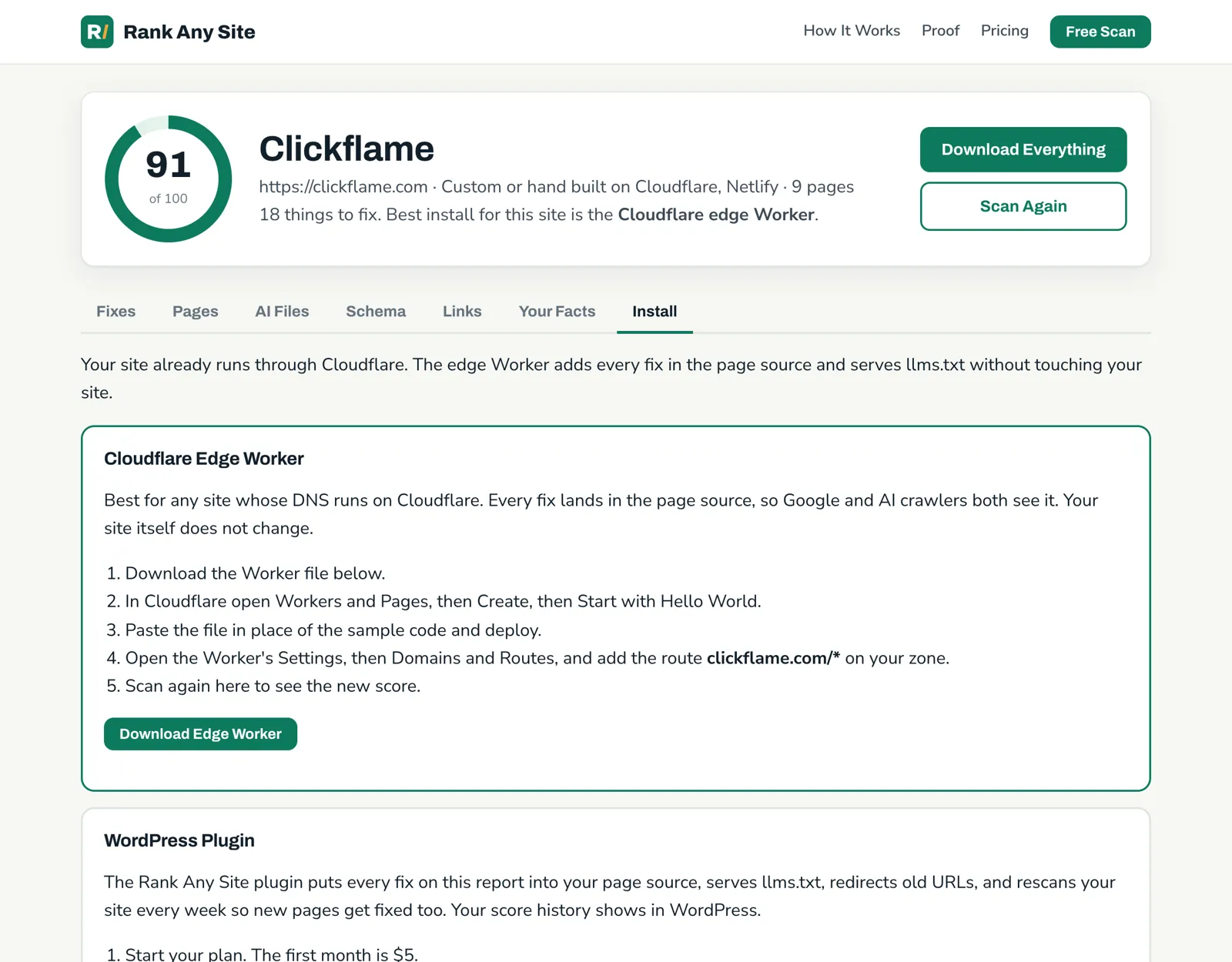
You don't move your website. You move where the domain's DNS is managed. Then it takes five steps.
- Run the free scan and open the Install tab.
- Download the edge Worker file.
- In Cloudflare, open Workers and Pages, create a Worker and paste the file in.
- Open the Worker's Settings, then Domains and Routes. Add the route for your domain with /* on the end.
- Scan again and check the page source with the command above.
Cost is small. Cloudflare's pricing page lists a free Workers plan with 100,000 requests a day and 10 milliseconds of CPU time per request. The paid plan starts at $5 a month with 10 million requests a month included. Every file on the route counts as a request, images included. A local shop's site still won't come near 100,000 a day. CPU time on a heavy page is the number to watch your first week.
Builders are the tricky part. GoHighLevel, Webflow and others already serve sites through Cloudflare on their side. That doesn't put the site in your account. All eight GoHighLevel sites in my scan answered through Cloudflare. That was HighLevel's Cloudflare, not the shop's. Cloudflare calls the stacked setup Orange to Orange. Its docs say your zone's settings apply first and the builder's second. They also say it needs a proxied CNAME record in your zone. A plain A record on the bare domain doesn't count. I haven't run this Worker on a live stacked setup yet. If you do, test one page before you trust it.
Plenty of sites are already in the right place. We rescan 149 sites every day. As of November 16, 2026, 102 of them answer through Cloudflare. Most of those are hand built sites where the files are also easy to change. The edge Worker earns its keep on the ones where they aren't.
Snippet, Edge Worker or the Builder's Own Fields
You have three places to put a fix. They aren't equal.
| Where the fix goes | In the page source? | What you need | Best when |
|---|---|---|---|
| The builder's own fields | Yes | A login and time per page | You can get in and the builder has the box |
| Edge Worker | Yes | DNS in your own Cloudflare account | No login, no developer, or no box for the tag |
| Snippet | No, added when the page runs | One paste in the head code box | You want every page covered today |
| Files bundle | Yes | The site's files | The site was built by hand |
If you can log in, use the builder's fields first. A title typed into the builder is the simplest thing that could work. It has no moving parts.
If you can't, the edge Worker is the only one of these that reaches the page source from outside. That's what the test showed. Five pages. No login. Tags in the source.
The snippet is the fast cover. Paste it once and Google gets every fix. Just know which crawlers skip it.
Edge fixes carry one real risk. They're easy to forget. The tags aren't in your site builder, so the next person to work on the site won't see them there. Two years on, someone redesigns the site and wonders why every page has two descriptions. Write it down. Put a note in the site's settings or your password manager that says a Cloudflare Worker edits the head. The fixes are baked into the file too. After a big change to the site, scan again and paste the new file.
One more thing people worry about. This Worker doesn't check who is asking. A person, Googlebot and an AI crawler all get the same page. That matters. Google's spam policies define cloaking as showing people one thing and search engines another. An edge script that did that would be a problem. This one doesn't.
You can see how the scan works, check the plans, or look at the October test and the same tool on seven kinds of website.
Answers to the Usual Questions
What is edge SEO?
Edge SEO means making SEO changes at the network layer that sits in front of your website, not inside the website itself. A small program at the CDN reads each page on its way out and edits the HTML. It can add a title, a meta description, schema or a redirect. The visitor and the crawler both get the edited page. Your site builder never changes.
Is edge SEO cloaking?
Not the way this Worker does it. Google defines cloaking as showing one version of a page to people and a different one to search engines. The Rank Any Site edge Worker doesn't look at who is asking. Every visitor and every crawler gets the same edited page. An edge script that served crawlers something people never see would be a different story.
Do I have to move my website to Cloudflare?
No. Your site stays where it is. Your domain's DNS has to be in your own Cloudflare account, and the record that points at your site has to be proxied. Cloudflare calls that orange clouded. Then you add a route like yoursite.com/* to the Worker. Cloudflare's docs list those as the requirements for a route.
What does a Cloudflare Worker cost?
Cloudflare's pricing page lists a free Workers plan with 100,000 requests a day and 10 milliseconds of CPU time per request. The paid plan starts at $5 a month and includes 10 million requests a month. A small local business site will sit far under the free request limit. Watch CPU time on heavy pages during your first week.
Will ChatGPT see fixes that a JavaScript snippet adds?
Most likely not. Vercel tracked AI crawlers on its network and published the results in December 2024. The crawlers from OpenAI, Anthropic and Perplexity did not run JavaScript. Google's Gemini and Apple's crawler did. A fix added by a script after the page loads is invisible to a crawler that never runs the script. A fix in the page source is not.
Does the edge Worker work on GoHighLevel, Webflow or Shopify?
Only if your domain runs through your own Cloudflare account in front of the builder. Many builders already use Cloudflare on their side, and that alone doesn't count. Cloudflare calls the stacked setup Orange to Orange, and says it needs a proxied CNAME record in your zone. I ran this test locally against a GoHighLevel site, not on a live stacked setup. For most builder sites, the builder's own fields plus the snippet are the simpler path.
Citations
- Cloudflare Docs, HTMLRewriter
- Cloudflare Docs, Workers Routes
- Cloudflare Docs, Workers Pricing
- Cloudflare Docs, How Orange to Orange Works
- Google Search Central, Understand JavaScript SEO Basics
- Google Search Central, Spam Policies for Google Web Search
- Vercel, The rise of the AI crawler (December 2024)
- Search Engine Journal, What Is Edge SEO and Why You Should Adopt It (December 2018)
Scan your own site free
Paste your address and see your score, what is missing, and the fixes written for your platform in about a minute.