
458 of 684. That's how many images had no real alt text when I ran nine Squarespace business sites through Rank Any Site on November 6, 2026. 213 were blank. Another 245 used a file name or a timestamp, like a photo called 2025-10-06 17_35_56Z.jpg. Squarespace says it falls back to the file name when you don't write a description, and that's what these sites got.
Pick Rank Any Site as a preferred source on Google
Scores updated November 2026
Up Front
You can't install an SEO plugin on Squarespace the way you can on WordPress. You mostly don't need one. Squarespace already writes your sitemap, meta tags and schema. The nine sites scored a median of 71 and none of them was broken. They lost points on what only the owner can type. Image descriptions. SEO descriptions. One H1 per page. Squarespace also added an llms.txt setting this summer, and eight of the nine sites haven't turned it on. Most of these fixes go in Squarespace's own fields, so they land in the page source. Every crawler can read that.
- Nine Squarespace sites, 90 pages, scanned November 6, 2026. Four tree services, three plumbers, one roofer, one pest control company. Scores ran from 56 to 79.
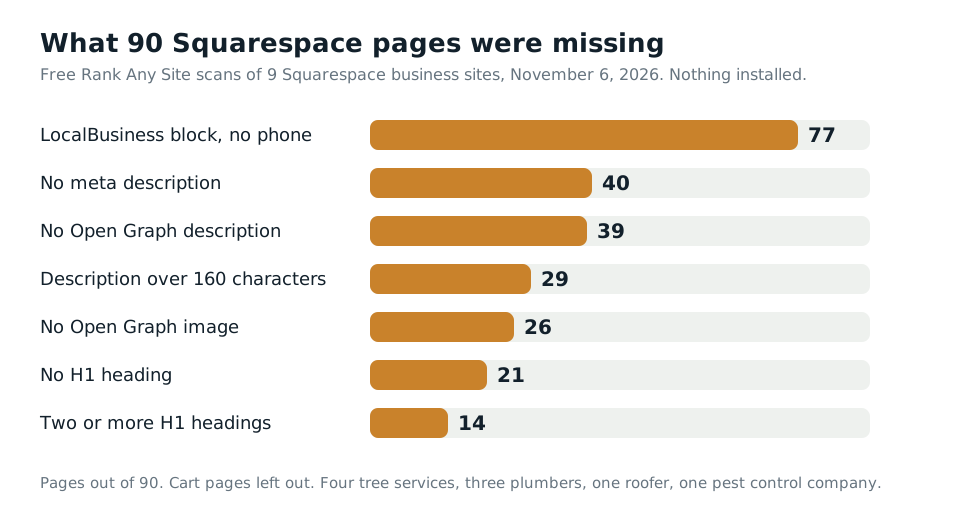
- Schema wasn't the gap. 89 of 90 pages had it. But all 77 LocalBusiness blocks left out the phone number.
- Only two sites named their trade in valid schema. They did it by hand, through Code Injection. A third tried, and its code had an error.
- 40 pages had no meta description and 29 had one over 160 characters. 35 pages had no H1 or more than one.
- One of the nine had an llms.txt file. The other eight returned a 404.
What Nine Squarespace Sites Really Served
I took the sites from a public roundup of trade websites that labels each one by platform. Then I checked the server header on each site. Four sites the roundup called Squarespace had already moved to something else, so I dropped them. The nine left are live Squarespace sites run by real local businesses. I won't name them. They didn't ask to be in a post.
The free scan reads up to 13 pages on each site. Seven sites also gave up their /cart page, which Squarespace marks noindex, as it should. I left those out of the counts. That leaves 90 pages, with nothing installed on any of them.
The median score was 71. That's a little under the median 74 we got on seven Shopify stores and eight Wix sites. The low scores came from small sites with thin pages. All nine had a robots.txt file and a sitemap. None of them blocked AI crawlers from their pages.
| What we found | Pages | Sites |
|---|---|---|
| LocalBusiness block with no phone | 77 | 8 of 9 |
| No meta description | 40 | 7 of 9 |
| No Open Graph description | 39 | 7 of 9 |
| Description over 160 characters | 29 | 5 of 9 |
| No Open Graph image | 26 | 5 of 9 |
| No H1 heading | 21 | 7 of 9 |
| Two or more H1 headings | 14 | 5 of 9 |
| A schema block that wasn't valid JSON | 12 | 1 of 9 |
| No llms.txt file | n/a | 8 of 9 |
Descriptions are the easy win. Three of the nine homepages had none. Squarespace tells you to write 50 to 300 characters, then says search engines cut them off around 160. Google says there's no set limit, but it trims the snippet to fit the screen. So write to 160 and put the point first. Google also says each page should have its own. On five sites, at least two pages shared one.
Headings came next. A Squarespace text block can be set to Heading 1 anywhere on a page. So it's easy to end up with two, or with none. One homepage in the scan had three.
Squarespace Writes Your Schema, and Leaves Out the Phone
This is where Squarespace beats Wix. On the eight Wix sites, 61 of 76 pages had no schema at all. On these nine Squarespace sites, 1 of 90 had none. Squarespace adds its blocks to nearly every page without asking.
Look inside those blocks and it thins out. Squarespace builds them from the business info you enter. 39 of the 77 had no address in them. On one site the hours field was nothing but commas. And not one of the 77 held a phone number. When a phone showed up, it was in a separate Organization block. Google lists telephone as a recommended field for LocalBusiness. It also says to use the most specific type you can, like Plumber over plain LocalBusiness.
None of this is broken. Google can still find your phone in other places. But a plumber whose schema says only LocalBusiness, with no phone, is giving away an easy signal. And Squarespace says plainly that you can't edit or remove the schema it generates.
You can add to it, though. Two of the nine sites did. One added a RoofingContractor block and one added a Plumber block, across every page. The phone and the trade are right there in the source. A third site tried the same thing and shows the risk. Its Plumber block had stray text after the end of the code. That made it invalid JSON on 12 pages, so the block tells crawlers nothing. Check anything you paste in the Schema.org validator before you trust it.
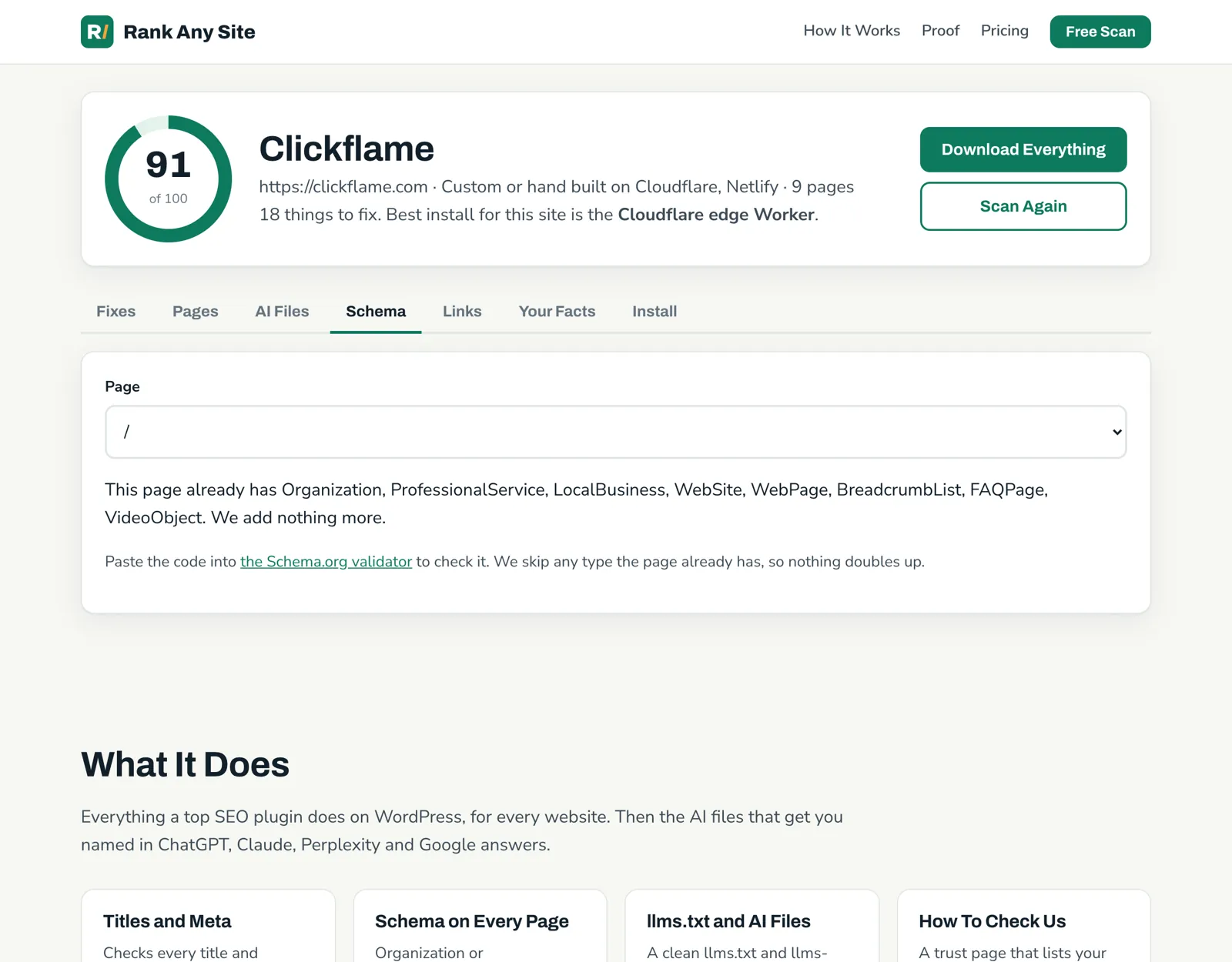
Our tool has a clear limit on this one. The Schema tab skips any type a page already has, so nothing doubles up. On these sites it wrote WebPage and BreadcrumbList blocks for most pages, and FAQPage blocks on 16 pages that had real questions on them. It won't rewrite Squarespace's LocalBusiness block, because nothing can. For a Plumber or RoofingContractor block with your phone in it, write one and paste it into the site header.
The Alt Text Nobody Wrote
Back to the opening number. Of 684 different images across the nine sites, 213 had blank alt text and 245 had a file name or a timestamp. That's 67 percent. On one site alone, 101 images had file names for alt text.
A plain blank check passes those 245. I found them by pulling the raw alt text out of the scan data and reading it. So don't assume a tool caught them. Open your own image blocks and look.
The fix is dull and it works. Write what the image shows, in the image's description field. "Crew replacing a water heater in a garage" tells Google and a screen reader something. A timestamp tells them nothing. Squarespace's own SEO report, on version 7.1 sites, scans for missing alt text and missing page descriptions. Run it first. Then read through what's left.
Squarespace Has an llms.txt Tab Now
Older guides tell you to fake an llms.txt on Squarespace with a redirect. You don't need that on version 7.1. Squarespace's help page, updated July 22, 2026, puts it in the SEO/AI Visibility panel. Click SEO Settings, then the LLMS.txt tab. Paste your text and save. It's off until you do.
Squarespace doesn't write it for you. That's the opposite of Wix, which writes a stock file for you and links only the homepage. So on Squarespace the file is empty until the owner acts, and eight of nine hadn't. The ninth, a plumber, had a long file listing its services, service areas and blog posts. The file came back with a noindex header, so it won't sit in Google's results as a page of its own.
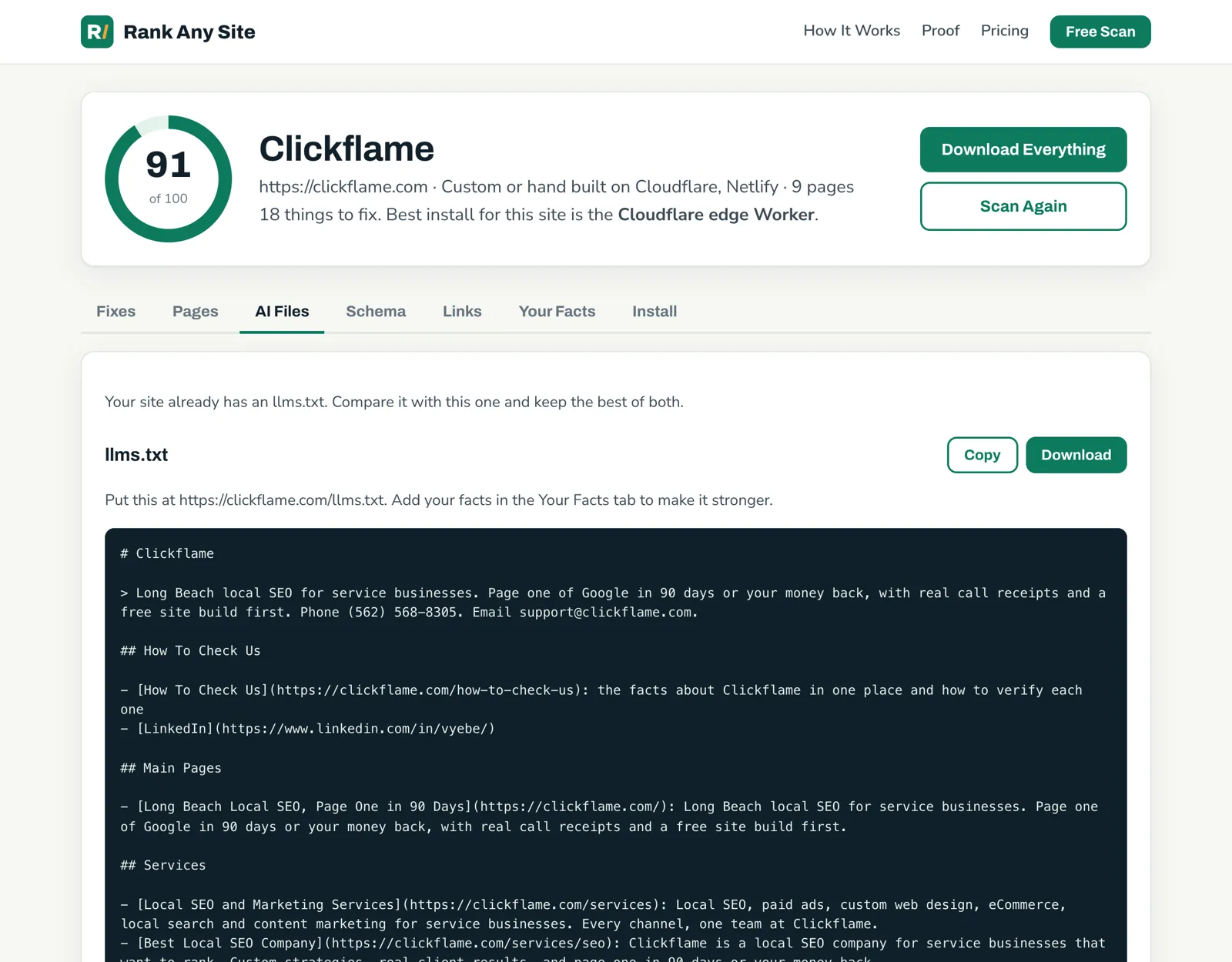
Rank Any Site writes that text from your own pages and the facts you give it. Empty fields print nothing, and it never makes up a fact. Copy it from the AI Files tab and paste it in.
Keep your hopes level. Squarespace itself calls llms.txt a proposed standard that's still in development, and it doesn't say which AI tools read the file. It takes five minutes, so I'd do it. I wouldn't pay for it.
While you're in settings, open the Settings panel and go to Crawlers. Make sure Block known artificial intelligence crawlers is unchecked, unless you want it on. Squarespace leaves it off by default. You may see GPTBot and ClaudeBot named in your robots.txt and think you're blocked. On all nine sites those names sat in a group with every other crawler, under the same few rules for admin paths like /config and /api. The pages themselves stayed open.
Where Each Fix Goes Inside Squarespace
This is the job a plugin does on WordPress. On Squarespace, you do it in a few set places. The right one depends on who needs to read the fix.
| Fix | Where it goes | In the page source? |
|---|---|---|
| SEO title and description | Pages panel, gear icon, SEO tab | Yes |
| Page address | Pages panel, gear icon, URL slug | Yes |
| Alt text | The image's description field | Yes |
| One H1 per page | The text block's style | Yes |
| Schema for one page | Gear icon, Advanced, Page Header Code Injection | Yes |
| Schema for every page | Website Tools, Code Injection, Header | Yes |
| llms.txt | SEO/AI Visibility, SEO Settings, LLMS.txt | Yes, at /llms.txt |
| Everything at once | The Rank Any Site snippet in Code Injection, Header | No, added when the page runs |
Three limits to know. Squarespace lists Code Injection on the Core, Plus and Advanced plans and some older plans. Homepages don't get an SEO title field, so your site title and title format settings carry that page. And if you change a URL slug, Squarespace warns that the old address won't redirect on its own. Old links show a 404. Set a 301 from the old address to the new one in URL Mappings. Two pages in the scan had leftover addresses like /about-1 that were worth cleaning up.
The snippet is the fast layer. It's one line in the Header box, and it fixes every page the scan read. On the October test, an HVAC contractor on Squarespace went from 70 to 84, with issues down from 68 to 49, once the fixes were installed. But the snippet is JavaScript. Vercel tracked the big AI crawlers in December 2024 and found they didn't run it, with Google's Gemini and Apple's crawler as the exceptions. So treat it as the Google layer. Type the words that matter most into Squarespace's own fields.
The scan also lists an edge Worker as a second option, for a site whose DNS runs through Cloudflare. It writes every fix into the source before the page leaves. Most Squarespace owners won't need the extra setup, now that llms.txt has its own tab.
Your First Hour on a Squarespace Site
- Run the free scan on your site. It reads your live pages and scores them out of 100.
- Run Squarespace's SEO report and fill in the missing descriptions and alt text.
- Read your images by eye. Replace any file names and timestamps with plain words.
- Trim descriptions over 160 characters and give your homepage one.
- Check each page for one H1.
- Paste a block with your exact trade and phone into the site header. Run it through a validator first.
- Paste the text from the AI Files tab into the LLMS.txt tab.
- Add the snippet for Open Graph tags and anything you haven't done by hand.
The scan is free with no sign up. You can see how it works, check the plans, or see how the same tool runs on seven kinds of website.
Answers to the Usual Questions
Can you add plugins to Squarespace?
Not the way you do on WordPress. Nothing installs inside the site and runs on the server. Squarespace has Extensions, which are outside apps you connect, and it has Code Injection, where you paste code into the head of your pages. Squarespace's support team will help connect an extension but sends other questions to the extension's maker.
Does Squarespace allow SEO?
Yes. It writes your sitemap, gives pages static addresses, adds meta tags and adds schema on its own. You get an SEO title and an SEO description field on each page. The nine sites we scanned all had a robots.txt file and a sitemap. What they lacked was the part only the owner can type.
Does Squarespace have an llms.txt file?
Yes, on version 7.1 sites. Open the SEO/AI Visibility panel, click SEO Settings, then the LLMS.txt tab. It's off until you add text, and you write the text yourself. Squarespace calls llms.txt a proposed standard and doesn't say which AI tools read it.
Can I edit the schema Squarespace adds?
No. Squarespace says you can't edit or remove the schema it generates. You can add your own block next to it through Code Injection. Two of the nine sites we scanned did that to name their trade and add a phone number.
What is the downside of Squarespace for SEO?
Control. You can't change its stock schema, and Code Injection is listed only on the Core, Plus and Advanced plans and some older plans. Most of the common fixes still fit inside the normal page settings, so the limits matter less than people say.
Do AI crawlers read code added through Squarespace Code Injection?
They read what is in the page when it arrives. A JSON-LD block pasted into Code Injection is in the source, and our scanner, which doesn't run scripts, read those blocks on two sites. A script that adds tags after the page loads is different. Vercel found in December 2024 that the big AI crawlers it tracked did not run JavaScript, with Google's Gemini and Apple's crawler as the exceptions.
Citations
- Squarespace Help Center, How does Squarespace optimize my site for search results?
- Squarespace Help Center, Create an llms.txt file
- Squarespace Help Center, Using code injection
- Squarespace Help Center, Adding SEO descriptions
- Squarespace Help Center, SEO checklist
- Squarespace Help Center, Editing page titles
- Squarespace Help Center, Protect your SEO ranking after a site move or redesign
- Squarespace Help Center, URL slugs
- Squarespace Help Center, Request that AI models exclude your site
- Google Search Central, Local business structured data
- Google Search Central, Control your snippets in search results
- Vercel, The rise of the AI crawler (December 2024)
Scan your own site free
Paste your address and see your score, what is missing, and the fixes written for your platform in about a minute.