
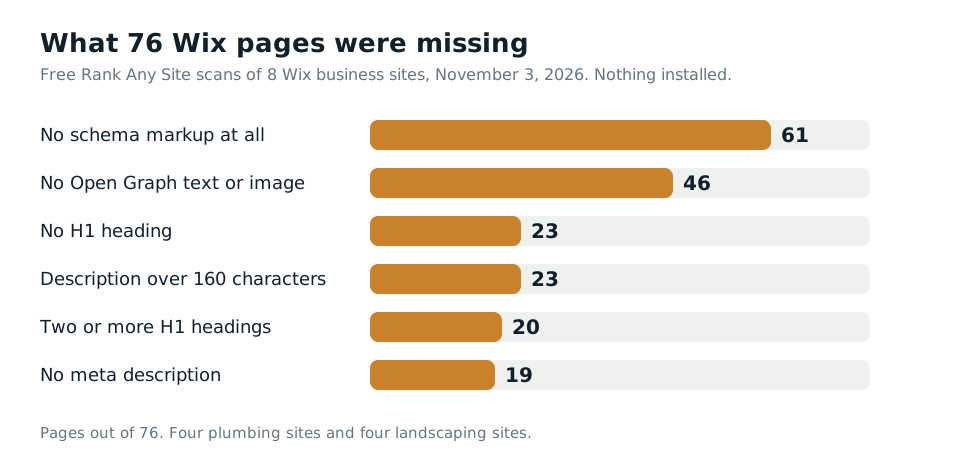
61 of 76. That's how many pages had no schema markup at all when I ran eight real Wix business sites through Rank Any Site on November 3, 2026. Wix had put business schema on six of the eight homepages. It stopped there. The service pages, the contact pages and the booking pages had nothing.
Pick Rank Any Site as a preferred source on Google
Scores updated November 2026
Up Front
A Wix SEO tool should show you what your live site really serves, page by page. Wix does more than people give it credit for. It renders pages on its own servers, writes your sitemap and robots.txt, and adds business schema to the homepage. It even writes an llms.txt file for you now. The eight sites lost points on the parts Wix leaves to the owner. Inner pages with no schema. Pages with no H1 or two of them. Descriptions that were blank or too long. And a stock llms.txt that linked only the homepage. Most of the fixes go into Wix's own SEO fields, which puts them in the page source. That's the version Google reads and the only version most AI crawlers read.
- Eight Wix sites, four plumbers and four landscapers, 76 pages, scanned November 3, 2026. Scores ran from 66 to 89. The median was 74.
- 61 of 76 pages had no schema. On six of the eight sites, the homepage was the only page with any.
- 23 pages had no H1 and 20 had two or more. Three homepages had no H1 at all.
- All eight served the llms.txt Wix writes by default. Each one linked a single page, the homepage.
- Wix lets you paste up to five schema blocks on each page. That code is in the source, so every crawler can read it.
What Eight Wix Sites Really Served
I took the sites from Wix's own lists of good plumbing and landscaping websites. I checked each one for Wix's server headers before I scanned it. All eight were live Wix sites run by real local businesses. I won't name them. They didn't ask to be in a post.
The free scan reads up to 13 pages on each site. It found 76 pages in all. One landscaping site gave the scanner just its homepage. The rest gave 6 to 13 pages each. Nothing was installed on any of them. These are the sites as their owners left them.
The scores were close together. Four sites landed between 72 and 74. The best plumber scored 89. The lowest landscaper scored 66. None of them was broken. That's worth saying. Every site had a robots.txt file and a sitemap. Most pages answered fast, with a median server time of 377 milliseconds.
| What we found | Pages | Sites |
|---|---|---|
| No schema markup on the page | 61 | 7 of 8 |
| No Open Graph text or image | 46 | 5 of 8 |
| Description over 160 characters | 23 | 6 of 8 |
| No H1 heading | 23 | 4 of 8 |
| Two or more H1 headings | 20 | 4 of 8 |
| No meta description | 19 | 3 of 8 |
| Leftover page address like /contact-5 or /blank | 6 | 3 of 8 |
| Stock Wix llms.txt, never changed | n/a | 8 of 8 |
Schema was the big one. Six of the eight homepages carried LocalBusiness schema from Wix. But a plumber's drain cleaning page or a landscaper's hardscaping page had none. Those are the pages that should show up for "drain cleaning near me." Schema tells Google and AI tools what the page is, who does the work and where.
Headings were next. Wix lets you style any text block as an H1, so it's easy to end up with two on one page, or none. Three of the eight homepages had no H1. Three more had two. One H1 that names the page topic is the simple rule.
Descriptions split two ways. 19 pages had none, so Google wrote its own. 23 pages had one longer than 160 characters. Google says there's no hard limit, but it cuts the snippet to fit the screen. So the end of a long description often never shows. Google also says each page should get its own description. Two sites reused the same one across pages.
Then there were the leftover addresses. Six pages on three sites had addresses like /contact-5, /services-4 or /blank. They look like pages that got copied and never renamed. Those words show in the search result. A plain address like /drain-cleaning says what the page is.
Wix Writes Your llms.txt, and It Lists One Page
This is the finding I didn't expect. Every one of the eight sites had an llms.txt file. None of the owners wrote it. Wix did.
Wix's help center says it builds the file and keeps it up to date for sites with a paid plan and a connected domain. On all eight sites, the file had the same shape. A title. A short summary, about 60 to 80 words, that read like an AI wrote it from the homepage. One link, to the homepage. Then about 60 lines on Wix's MCP server, which lets AI agents query the site, book a slot or start a purchase.
That last part is useful for agents. It's not much help for an AI answer about who to call. Not one of the files linked a single service page. No drain cleaning page, no lawn care page, no contact page. One site's file had no summary at all, just the title and the agent block.
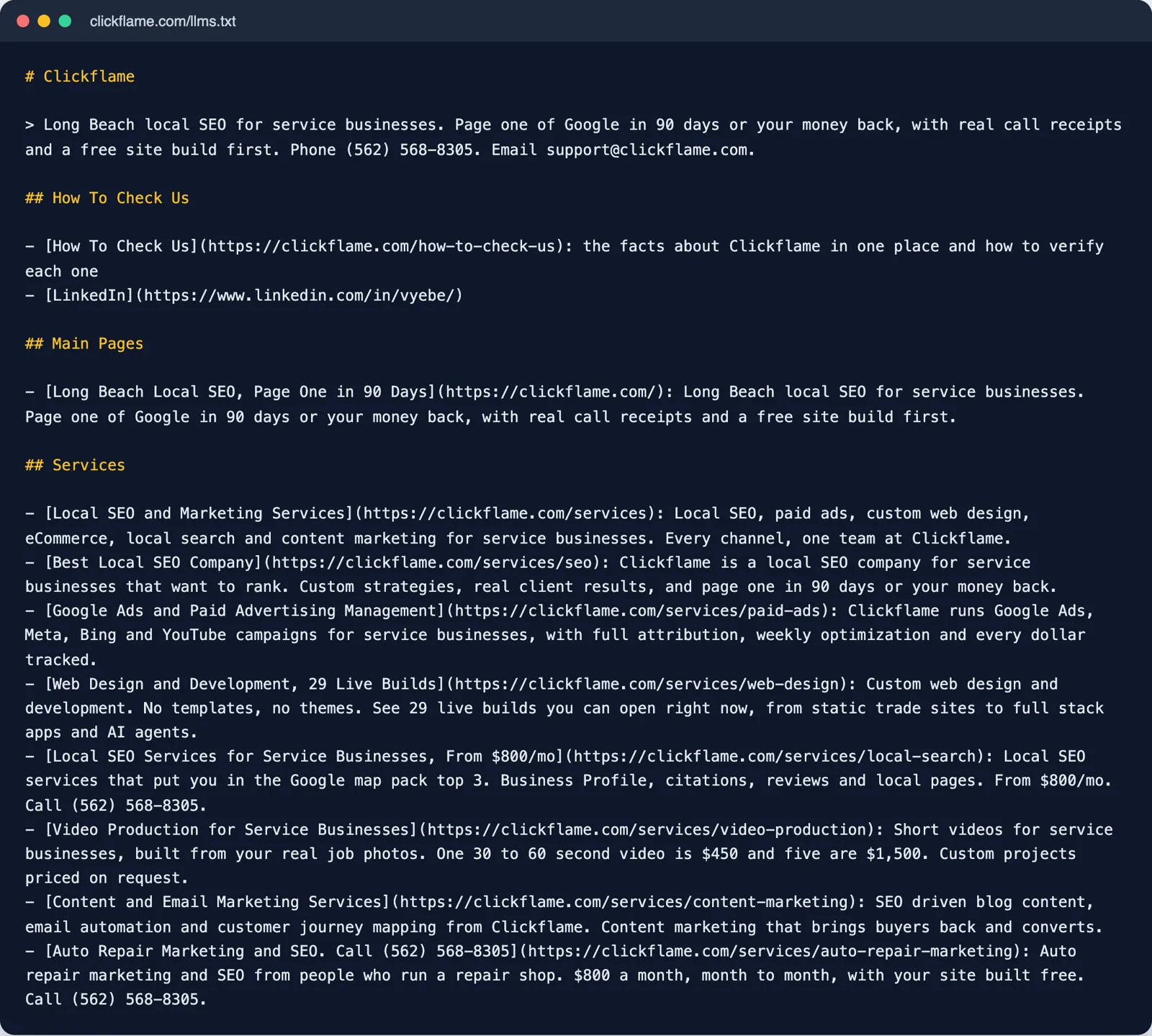
Compare that with a file that lists each page and says what it covers. An AI crawler that reads it learns the services, the phone number and where to verify the business. Rank Any Site writes that file from your own pages and the facts you give it. Empty fields print nothing. It never makes up a fact.
Wix lets you change the file. Go to SEO and GEO in your dashboard, scroll to Tools and settings, and click Go to llms.txt. Open More Actions and pick Edit file. Paste in the new text and save. One catch matters. Wix says that once you edit the file, it stops updating on its own. Add a new service page later and you have to add it to the file yourself. A rescan will tell you when the file has fallen behind.
You can also keep the Wix agent block. Paste your page list above it. Then you get both. Agents still find the MCP tools, and answer engines get a map of your services.
Where Each Fix Goes Inside Wix
The scan gives you a list. The work is knowing where each fix goes. Wix gives you more places to put code than most builders. The right one depends on who needs to read it.
| Fix | Where it goes in Wix | In the page source? |
|---|---|---|
| Title and description | Pages and Menu, More Actions, SEO basics | Yes |
| Page address | SEO basics, URL slug | Yes |
| Schema for one page | Advanced SEO, Structured Data Markup, up to 5 per page | Yes |
| One H1 per page | The text block's style in the editor | Yes |
| llms.txt | SEO and GEO, Tools and settings, Go to llms.txt | Yes |
| Everything at once | The Rank Any Site snippet in Settings, Custom Code, Head | No, added when the page runs |
Start with SEO basics. In the Wix Editor, open Pages and Menu. Click the three dots next to a page and pick SEO basics. Type the title, the description and a clean URL slug. If you change a slug on a page that already ranks, point the old address at the new one with a 301 redirect.
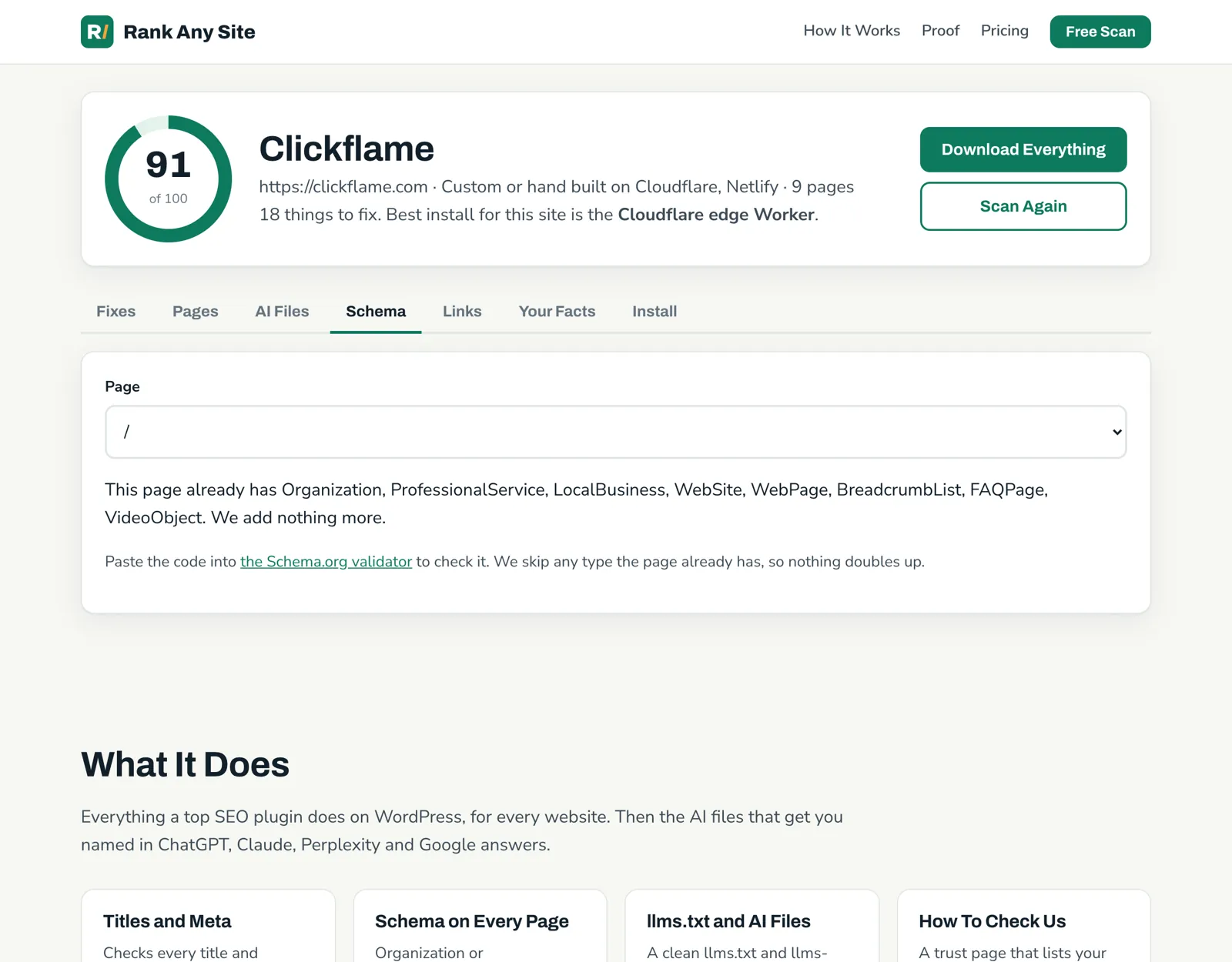
Schema goes one tab over. Under Advanced SEO, Wix has a Structured Data Markup box. Wix allows up to five JSON-LD blocks per page. The Schema tab in a Rank Any Site report gives you the code for each page. It skips any type the page already has, so nothing doubles up. Copy it in, save, publish.
Why bother doing it by hand when a snippet can do it all? Because Wix renders pages on its servers. Wix says so on its own SEO page. Anything you type into those fields is in the HTML when it leaves Wix. Google reads it. So do AI crawlers that never run JavaScript.
The snippet is the fast layer. Go to Settings, then Custom Code under Development and integrations. Click Add Custom Code, paste the one line, set it to All pages and place it in the Head. Wix needs a published site with a connected domain for this. The snippet fixes every page the scan read, including schema and Open Graph tags. But it's JavaScript. Vercel tracked the big AI crawlers in December 2024 and found none of them ran it. So treat the snippet as the Google layer, and type the words that matter most into Wix's own fields.
The scan also lists the edge Worker as a second option for a Wix site whose DNS runs through Cloudflare. It writes every fix into the source before the page leaves. It's more setup, and Wix doesn't walk you through it. Most Wix owners will do fine with the fields plus the snippet.
Your First Hour on a Wix Site
You don't need a stack of apps to start. Wix covers the base. Work through these in order and you'll fix most of what turned up on the eight sites.
- Run the free scan on your site. It reads your live pages and scores them out of 100.
- Open the Schema tab. Paste each page's code into Advanced SEO, Structured Data Markup, starting with your service pages.
- Check every page for one H1. Fix pages with none or two.
- Write a description for each blank page. Trim the ones over 160 characters.
- Rename leftover addresses like /contact-5 and add a 301 from the old one.
- Replace or extend the stock llms.txt with the file from the AI Files tab.
- Paste the snippet into Custom Code for Open Graph tags and anything you haven't done by hand.
- Scan again after you add pages, since Wix stops updating an edited llms.txt.
The scan is free with no sign up. You can see how it works, the October test of 61 small business sites, or how the same tool runs on seven kinds of website. If you also run a store, the Shopify scan post covers the same checks there.
Answers to the Usual Questions
Is Wix SEO any good?
Wix gets the base right. It renders pages on its servers, writes a sitemap and a robots.txt file, and puts business schema on the homepage. The gaps are the parts it leaves to you. On the 8 sites we scanned, inner pages had no schema, some had no H1, and a few had no meta description.
How do I edit the SEO title and description on a Wix page?
In the Wix Editor, open Pages and Menu, click the More Actions icon next to the page, and pick SEO basics. Type the title tag and meta description there. Wix Studio calls the menu Pages instead.
Does Wix make an llms.txt file?
Yes, on sites with a paid plan and a connected domain. Wix writes and updates it for you. On every site we checked, it held a short summary, a link to the homepage and a long block about Wix's AI agent tools. You can edit it from the SEO and GEO dashboard, but then Wix stops updating it.
Can I add schema markup to a Wix page?
Yes. Open the page's SEO settings, go to Advanced SEO and then Structured Data Markup. Wix lets you paste up to five JSON-LD blocks per page. That code is part of the page Wix serves, so search engines and AI crawlers can both read it.
Do AI crawlers read code added through Wix Custom Code?
Only what is in the page when it arrives. A script that adds tags after the page loads is read by Google. Vercel found in December 2024 that none of the big AI crawlers ran JavaScript. Put the words that matter in Wix's own SEO fields.
Citations
- Wix Help Center, Understanding your site's llms.txt file
- Wix Help Center, Customizing your page's SEO settings in the SEO panel
- Wix Help Center, Embedding custom code on your site
- Wix, SEO tools and features
- Wix Developers, About the Wix site MCP
- Google Search Central, Control your snippets in search results
- Vercel, The rise of the AI crawler (December 2024)
Scan your own site free
Paste your address and see your score, what is missing, and the fixes written for your platform in about a minute.