
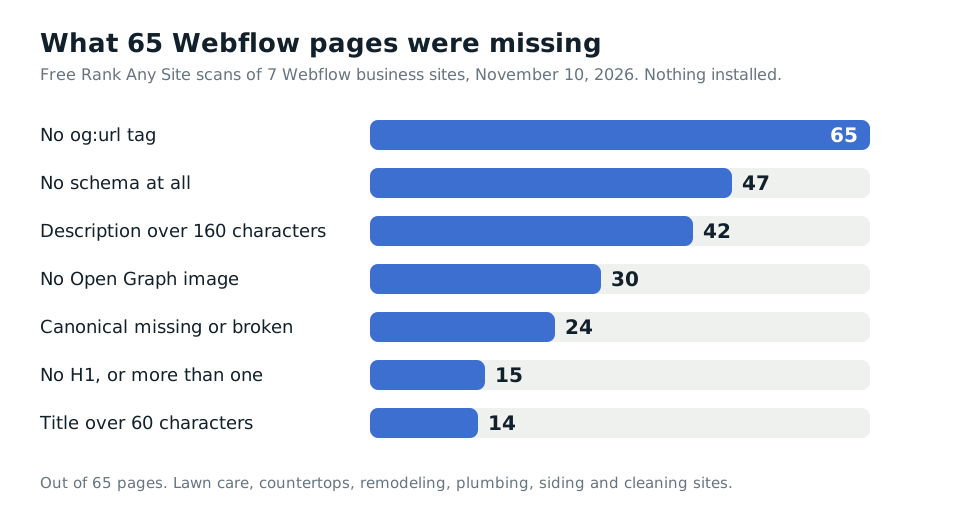
47 of 65. That's how many pages had no schema at all when I ran seven Webflow business sites through Rank Any Site on November 10, 2026. On three of the sites, not one page had any. Webflow gives every page a Schema markup field. On those sites, it sat empty.
Pick Rank Any Site as a preferred source on Google
Scores updated November 2026
Up Front
Webflow is good for SEO. You don't need a plugin, and none of these sites were broken. The seven scored a median of 73, right next to the Shopify and Wix sites I tested. They lost points on fields only the owner fills in. Schema. One H1 per page. Descriptions that fit. A canonical tag with the right domain in it. And an llms.txt file, which Webflow has let you upload since July 2025 and none of the seven had done. Almost every fix goes in Webflow's own settings, so it lands in the page source. Every crawler can read that.
- Seven Webflow sites, 65 pages, scanned November 10, 2026. Lawn care, countertops, two remodelers, a plumber, a siding company and a cleaning company. Scores ran from 68 to 80.
- 47 of 65 pages had no schema. Every block we did find was added by the owner.
- One project page had 43 H1 headings. A blog page had 28. A one page site had 11.
- One site's canonical tag pointed every page at a misspelled domain that doesn't exist. Another had no canonical tag at all.
- None of the seven had an llms.txt file. One blocked 19 crawlers in robots.txt, most of them AI bots.
What Seven Webflow Sites Really Served
I took the sites from Webflow's own showcase of home service websites. Then I checked the server headers on each one to make sure it still runs on Webflow. All seven do. They're real local businesses, and I won't name them. They didn't ask to be in a post.
The free scan reads up to 13 pages per site. Two of the seven were one page sites. Their sitemaps list a single address, so the scan read one page each. That leaves 65 pages, with nothing installed on any of them.
The median score was 73. That's one point under the median 74 on seven Shopify stores and eight Wix sites, and two over the 71 on nine Squarespace sites. All seven Webflow sites had a robots.txt file and a sitemap. Six of them let every AI crawler in.
| What we found | Pages | Sites |
|---|---|---|
| No og:url tag | 65 | 7 of 7 |
| No schema at all | 47 | 4 of 7 |
| Description over 160 characters | 42 | 6 of 7 |
| No Open Graph image | 30 | 4 of 7 |
| Canonical tag missing | 13 | 1 of 7 |
| Canonical tag pointing at a dead domain | 11 | 1 of 7 |
| Two or more H1 headings | 11 | 5 of 7 |
| Title over 60 characters | 14 | 4 of 7 |
| No H1 heading | 4 | 3 of 7 |
| No llms.txt file | n/a | 7 of 7 |
Webflow Leaves the Schema Field Empty
This is the big gap, and it's the opposite of Squarespace. On the nine Squarespace sites, 89 of 90 pages had schema, because Squarespace writes it for you. On these seven Webflow sites, 47 of 65 pages had none.
The 18 pages that did have schema got it by hand. Three sites had typed in a LocalBusiness block. A fourth had WebPage and Service blocks on five pages. Three sites had nothing on any page. That's a countertop shop, a plumber and a cleaning company with no schema telling Google or an AI tool who they are.
Webflow doesn't hide the field. Open the Pages panel, click the gear next to a page, and scroll to Schema markup. You can paste your own or click Generate schema markup and let Webflow AI write it. Webflow says either way needs a paid Site plan or a paid Workspace. On a CMS template page, you can bind Collection fields so each item gets its own data. Webflow lists Reference, Multi-reference and Multi-image fields as not supported there.
Two warnings from Webflow's own help page. Don't put schema in both the Schema markup field and custom code, or you get duplicates. And check what you paste in the Schema Markup Validator before you trust it.
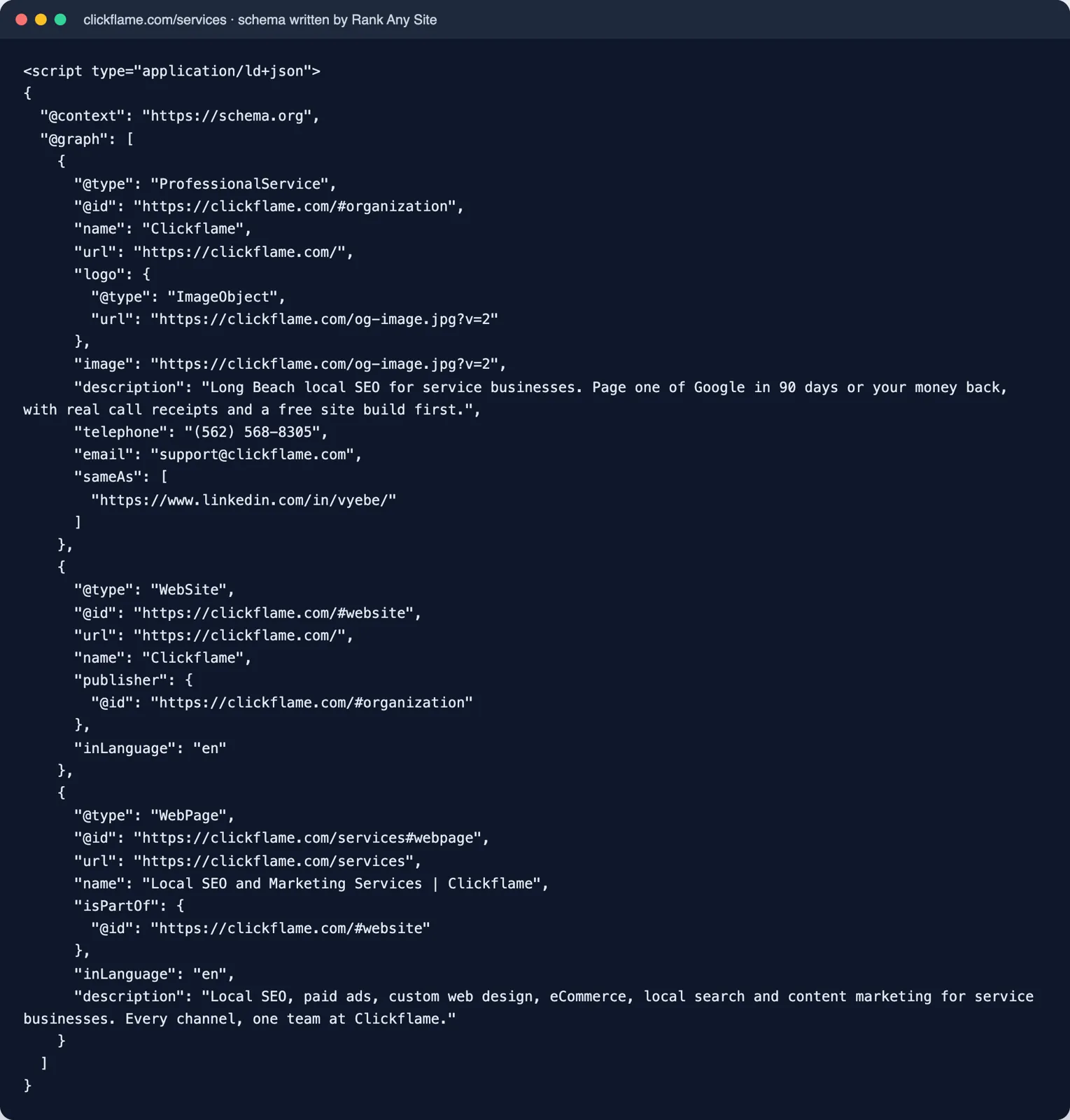
The scan wrote 65 schema blocks for these sites, one for every page it read. Each one names the business, the site and the page, with no fact made up. Fields you leave empty print nothing. For a local business, go one step further than the scan can by itself. Google says to use the most specific type you can, like Plumber over plain LocalBusiness, and lists telephone as a recommended field. Add both before you paste it in.
One Page Had 43 H1 Headings
This is the surprise in the set, and it comes from how Webflow is built. In Webflow, a heading's tag and its look are two separate things. You pick H1 through H6 as the tag. The class sets the size and color. So a designer can drop an H1 into a card, give it a small class, and it looks fine. Google still reads an H1.
That's what happened here. A plumber's project pages each had 43 H1 headings. Every project in a list of other projects used an H1 tag with a class named like an H2. A cleaning company's blog page had 28, one for each post title in its Collection list. A one page remodeling site had 11, including its phone number. Four other pages on three sites had no H1 at all.
The fix takes minutes. Select the heading on the canvas and change its tag to H2 or H3. Keep the class, so it looks the same. If it sits inside a Collection list, fix it once and every item follows. Then check the page has one H1 that says what the page is about.
A Typo in One Box Hit Every Page
Webflow builds your canonical tags from one setting. Site settings, then SEO, then Global canonical tag URL. You type your base address once, and Webflow joins it to each page's slug. It's a good system with one weak spot. A typo in that box lands on every page.
One lawn care site had exactly that. Its canonical tag pointed every page at a version of its own domain with a letter dropped from the www and an extra letter in the name. That domain doesn't exist. I checked, and it doesn't resolve. Google calls a canonical tag a strong signal for which address to show. This one sends every page's signal to nowhere. Google will likely ignore it and pick its own, but that's Google guessing, not the owner deciding.
A cleaning company had the other problem. None of its 13 pages had a canonical tag. Webflow's help page says what to type. Include https, include www if your default domain uses it, and leave off the trailing slash. Copy the address straight from your browser bar so you can't misspell it.
Open Graph had its own gap. All 65 pages were missing og:url, and 30 were missing og:image. The Open Graph protocol lists both among its four required tags. The scan found no og:url tag on any of them. The snippet adds it.
Descriptions ran long too. 42 of 65 pages had one over 160 characters, and the longest was 422. Webflow says there's no character limit but search engines cut long ones off. Google says the same, and trims to fit the screen. So write to about 160 with the point first. Webflow has no sitewide description, so each page needs its own. On CMS pages you can build one from Collection fields.
Alt Text, AI Crawlers and llms.txt
On the five sites with more than one page, I counted 342 different images. 205 had blank alt text. That's 60 percent. Some of those are fine. Webflow lets you mark an image as Decorative, which is the right call for an arrow or a divider. But team photos, finished jobs and project shots aren't decoration.
Two alt texts tell the story better than the count. One countertop site still had alt text from the template it was built on, naming the template. Another image's alt text was just the words blank image. Webflow's Audit panel can find every image with missing alt text and have Webflow AI draft it. Read each one before you accept it.
Then robots.txt. Five of the seven sites had nothing in it but a sitemap line, so every crawler could read every page. A plumber's file was the outlier. It blocked 19 crawlers by name, most of them AI bots. The list included ChatGPT-User, Claude-User and PerplexityBot, the bots behind answers in ChatGPT, Claude and Perplexity. Blocking them may be what the owner wants. But if you want to show up in those answers, open Site settings, then SEO, then Indexing, and read what's there. Someone typed those lines.
Last, llms.txt. Webflow launched an upload for it on July 23, 2025. Go to Site settings, then SEO, then LLMs.txt, and upload the file. It must be UTF-8 and under 100 KB. Webflow serves it at your domain's root and keeps it out of search results. All seven sites returned a 404 for it.
Webflow doesn't write the file for you. That's like Squarespace, and unlike Wix, which writes a stock one. Rank Any Site's AI Files tab writes it from your own pages and the facts you give it. Save the text as llms.txt and upload it. Keep your hopes level. Webflow's own help page calls the format experimental and says its effect on AI search is unclear. It takes five minutes, so I'd do it. I wouldn't pay for it.
Where Each Fix Goes Inside Webflow
On WordPress, a plugin does this job. On Webflow, you do it in a few set places. Almost all of them write straight into the page source.
| Fix | Where it goes | In the page source? |
|---|---|---|
| Title and description | Pages panel, gear icon, SEO settings | Yes |
| Canonical tag, every page | Site settings, SEO, Global canonical tag URL | Yes |
| Canonical tag, one page | Pages panel, gear icon, Page canonical URL | Yes |
| Schema for one page | Pages panel, gear icon, Schema markup | Yes |
| One H1 per page | The heading's tag on the canvas | Yes |
| Alt text | Assets panel, or the Audit panel for all at once | Yes |
| robots.txt | Site settings, SEO, Indexing | Yes, at /robots.txt |
| llms.txt | Site settings, SEO, LLMs.txt | Yes, at /llms.txt |
| Everything at once | The Rank Any Site snippet in Site settings, Custom code, Head code | No, added when the page runs |
The snippet is the fast layer. It's one line in the Head code box, and it covers the gaps on every page, like og:url. Webflow lists custom code for sites with an active Site plan and for its paid Workspace plans. But the snippet is JavaScript. Vercel tracked the big AI crawlers in December 2024 and found they didn't run it, with Google's Gemini and Apple's crawler as the exceptions. So treat the snippet as the Google layer. Put the words that matter most in Webflow's own fields.
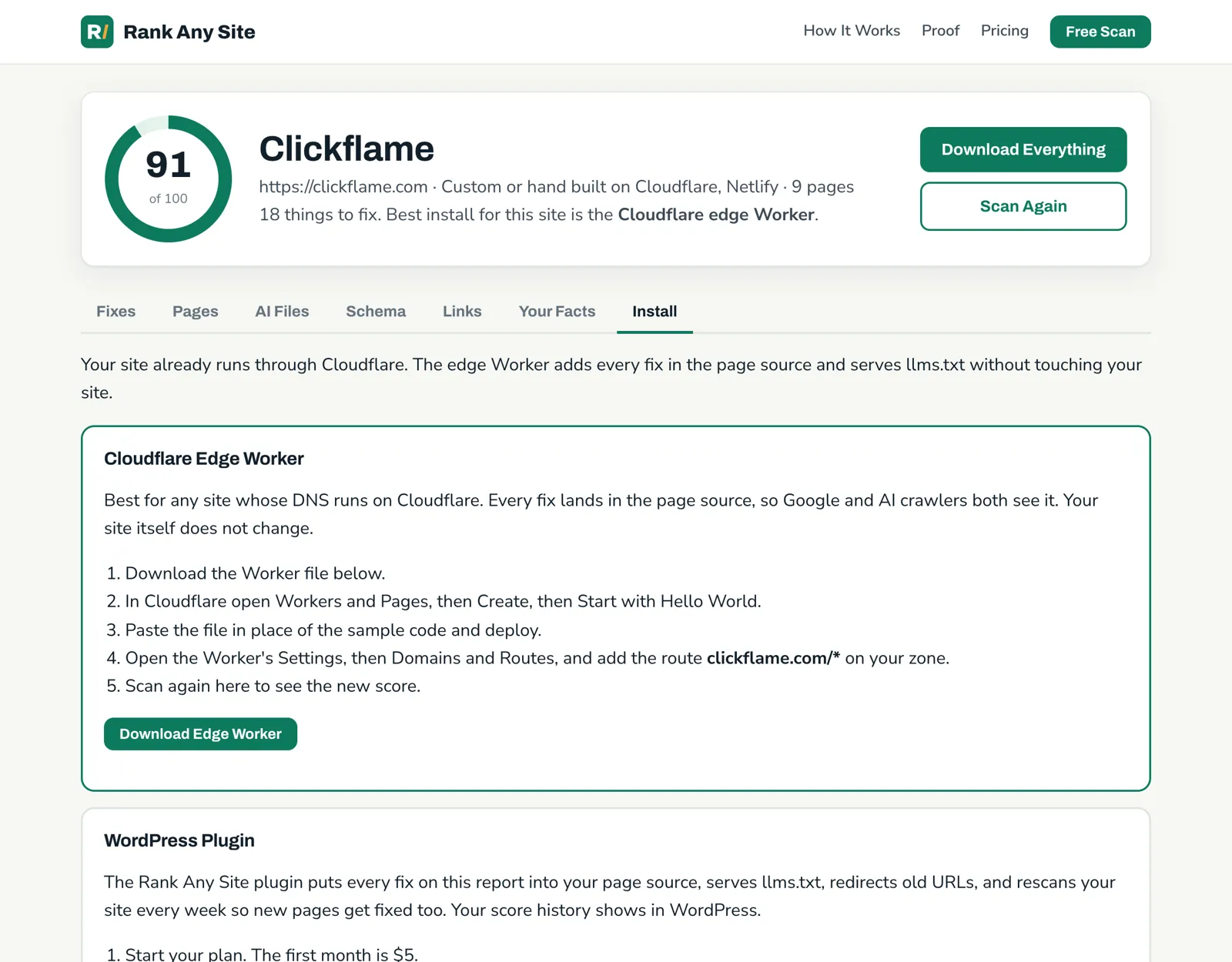
There's a second path for bigger sites. Webflow supports Cloudflare's Orange-to-Orange setup, where your own Cloudflare account sits in front of Webflow hosting. Webflow says you need a paid Site plan, and that sites made after April 21, 2025 are already on Cloudflare. With your domain in your own Cloudflare account, the edge Worker can write every fix into the source before the page leaves. Cloudflare marks Workers as supported in that setup, with a note that a Worker on the same address can get in the way. Most small business owners won't need it. The settings fields and the snippet cover them.
Your First Hour on a Webflow Site
- Run the free scan on your site. It reads your live pages and scores them out of 100.
- Open Site settings, then SEO. Check the Global canonical tag URL letter by letter.
- Read your robots.txt in the Indexing box. Remove any block you didn't mean to add.
- Search your pages for extra H1 tags, starting with Collection lists. Change them to H2 or H3.
- Paste a schema block into the Schema markup field on your home page, with your exact trade and phone. Run it through a validator first.
- Trim descriptions over 160 characters and give every page its own.
- Run the Audit panel for missing alt text. Mark true decoration as Decorative and describe the rest.
- Upload llms.txt from the AI Files tab, then add the snippet for og:url and anything left.
The scan is free with no sign up. You can see how it works, check the plans, or see the October test and how the same tool runs on seven kinds of website.
Answers to the Usual Questions
Is Webflow good for SEO?
Yes. It writes your sitemap, gives you clean page addresses, and lets you set the title, description and canonical tag for every page. The seven sites we scanned scored a median of 73, close to the Shopify and Wix sites we tested. What held them back was the part Webflow leaves to the owner. Schema, headings, descriptions and a few settings fields.
Does Webflow need an SEO plugin?
No. Webflow has no plugins in the WordPress sense. The SEO fields are built into Page settings and Site settings. Apps and pasted code can add more on top, but most fixes go straight into Webflow's own fields.
Does Webflow add schema markup on its own?
No page we scanned had schema that Webflow wrote by default. Webflow gives each page a Schema markup field in Page settings. You can type it, paste it, or have Webflow AI write it. On three of our seven sites, not one page had any.
How do I add an llms.txt file to Webflow?
Go to Site settings, then SEO, then LLMs.txt. Upload the file and save. It must be UTF-8 and under 100 KB. After you publish, it shows at your domain's root. Webflow notes it won't publish to the staging domain, and calls the format experimental.
Do I need a paid plan for SEO in Webflow?
For most of it, yes. Webflow says adding metadata and schema markup needs a paid Site plan or a paid Workspace. Custom code in the head needs an active Site plan or one of the paid Workspace plans. The free Starter plan is for building, not for a live business site.
Do AI crawlers read code added in Webflow custom code?
They read what is in the page when it arrives. Schema typed into the Schema markup field or pasted in the head is in the source, so any crawler can read it. A script that adds tags after the page loads is different. Vercel found in December 2024 that the big AI crawlers it tracked did not run JavaScript, with Google's Gemini and Apple's crawler as the exceptions.
Citations
- Webflow Help Center, Add SEO title and meta description
- Webflow Help Center, Add schema markup in Webflow to improve SEO and AEO
- Webflow Help Center, Set canonical tags to improve SEO
- Webflow Help Center, Include alt text on images
- Webflow Help Center, Upload an llms.txt file to your site
- Webflow Updates, Upload an llms.txt file for your site (July 23, 2025)
- Webflow Help Center, Request to block specific bots from visiting your site
- Webflow Help Center, Custom code in head and body tags
- Webflow Help Center, Using Cloudflare Orange-to-Orange (O2O) with Webflow
- Cloudflare Docs, Product compatibility for SaaS customers
- Google Search Central, How to specify a canonical URL
- Google Search Central, Control your snippets in search results
- Google Search Central, Local business structured data
- The Open Graph protocol
- Vercel, The rise of the AI crawler (December 2024)
Scan your own site free
Paste your address and see your score, what is missing, and the fixes written for your platform in about a minute.