
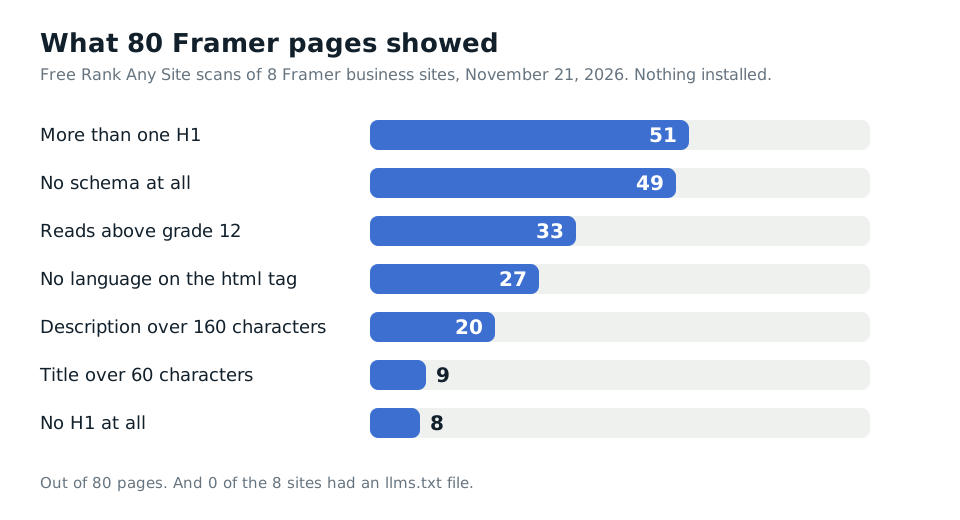
0 of 8. That's how many Framer business sites had an llms.txt file when I scanned them on November 21, 2026. The same eight sites got the hard part right. All 80 pages I read had a title, a description and a canonical tag sitting in the raw HTML.
Pick Rank Any Site as a preferred source on Google
Scan numbers updated November 2026
Up Front
Framer is good at the head of the page. It ships real HTML with your title, description and canonical already in it. Every site I scanned also had a robots.txt and a sitemap, and none blocked AI crawlers. The gaps are the parts Framer hands back to you. 49 of 80 pages had no schema at all. Not one site had an llms.txt. 51 pages showed more than one H1, though most of those are Framer's own breakpoint copies and Google skips them. The median score was 79.5 out of 100. The fixes are small, and each one has a box inside Framer.
- 8 Framer business sites, 80 pages, free Rank Any Site scans with nothing installed.
- Scores ran from 65 to 89. The median was 79.5.
- 80 of 80 pages had a title, a meta description and a canonical tag in the page source.
- 49 of 80 pages had no schema. 6 of 8 home pages had no business schema.
- 0 of 8 sites had an llms.txt file. Framer lets you upload one on its Pro plan.
What Eight Framer Sites Really Served
I found the sites in Framer's own public gallery. I picked ones that sell a real service to real people. An installer. A doctor. A private gym. Two cleaning companies. A physical therapy clinic. A plant nursery. A bridal makeup artist. I won't name them.
Then I ran each one through the free scan. It reads up to 13 pages a site the way a plain crawler does, with no JavaScript. It scores the site out of 100 and writes a fix for each page it read. Nothing on their sites changed.
| What the scan checked | Result on 8 Framer sites |
|---|---|
| Median score | 79.5 out of 100 |
| Lowest and highest score | 65 and 89 |
| Pages with a title in the source | 80 of 80 |
| Pages with a canonical tag | 80 of 80 |
| Sites with a robots.txt and a sitemap | 8 of 8 |
| Sites blocking AI crawlers | 0 of 8 |
| Pages with no schema | 49 of 80 |
| Home pages with no business schema | 6 of 8 |
| Sites with an llms.txt file | 0 of 8 |
| Pages with more than one H1 | 51 of 80 |
| Pages with no H1 | 8 of 80, all on one site |
That top half is better than most builders I've scanned. On the GoHighLevel sites, 29 of 70 pages had no title tag at all. Framer didn't miss one. The titles were in the HTML itself, so a crawler that never runs a script still gets them.
One odd thing. The scan called one site HubSpot. It's a Framer site. It also loads a HubSpot script, and the scan saw that first. That same site was the only one of the eight running through Cloudflare, so the report offered it the edge Worker too.
Framer Leaves the Schema to You
Schema is the block of code that tells Google and AI tools who you are. Your name, your phone, your address, what you do. 49 of the 80 pages had none. 6 of the 8 home pages had no business schema at all.
The two sites that did have it had clearly put it there. One home page carried a person, a medical practice and a website entry. Another had a beauty business and a person. On the other six home pages, nothing told Google what the business was.
Framer's help article on structured data says the same thing. You paste JSON-LD into a script tag in the head with Custom Code. On CMS pages you use field references like {{Title | json}} so each page gets its own values. The article warns that the unsafeRaw filter does not escape what it prints. A stray quote there can break the block.
The scan wrote a schema block for all 80 pages. You don't have to write one by hand. Open the report, pick the page, copy the block and paste it into Framer.
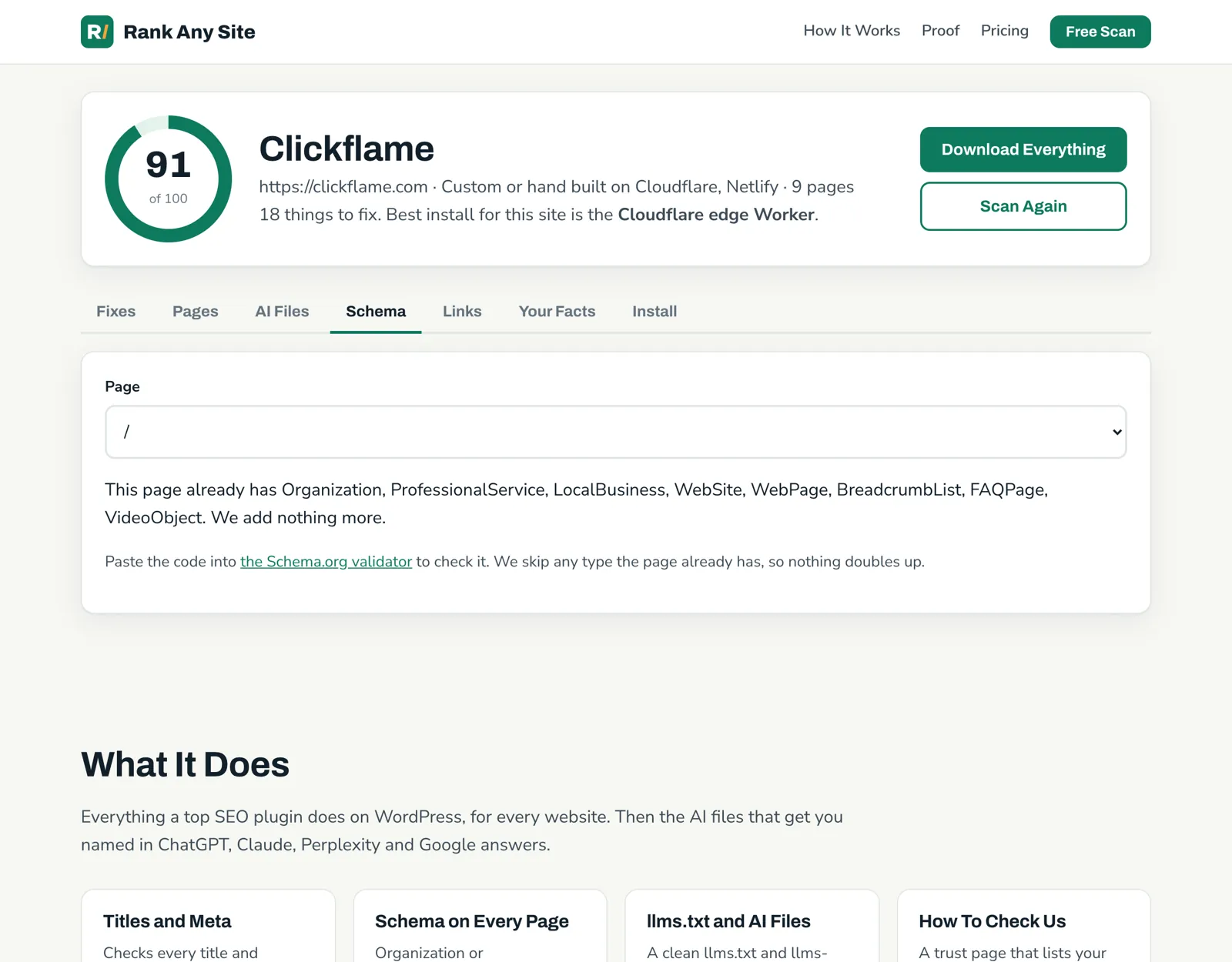
Where you paste it matters. Framer's custom code goes into the page it serves. A block pasted there is in the HTML. That's what you want. Vercel tracked AI crawlers in December 2024 and found the ones from OpenAI, Anthropic and Perplexity did not run JavaScript. A block that a script adds after the page loads may never reach them.
51 Pages With More Than One H1, and Why Most Are Fine
This number looks bad. 51 of 80 pages had more than one H1. One page had 13.
Look closer and most of them are the same heading over and over. I pulled the H1 text on 47 of those pages. On 41, the same words repeated two or three times. That's Framer's breakpoints. You design a desktop, a tablet and a phone layout. Framer puts a copy of the heading in each one and hides the ones you can't see.
Framer's help center says this outright. It copies some elements to support responsive layouts and shows or hides them with CSS. It says Google renders the page in a full browser and ignores the hidden copies. So for Google, three copies of the same H1 are one H1.
A raw HTML reader doesn't render anything. It sees three. I'd still not lose sleep over it. Two cases are worth your time, though.
- No H1 at all. One site had 8 pages with none. In Framer, select the main headline and set its tag to H1.
- Different H1s on one page. On the other 6 pages, the H1s had different words. Pick the one that names the page. Set the rest to H2.
No llms.txt Anywhere, and What It Costs to Add One
An llms.txt is a plain text file at the root of your site. It gives AI tools a short, clean summary of who you are and which pages matter. 0 of 8 Framer sites had one.
That's not because Framer blocks it. Framer's help center has a page for it. Open Site Settings, then Hosting, then Files. Upload the file and publish. Framer serves it at yoursite.com/llms.txt.
The catch is the plan. That help page lists file hosting for Pro and Enterprise. Framer's pricing page listed Basic at $10 a month and Pro at $30 a month in November 2026. So the file costs you a plan upgrade if you're on Basic.
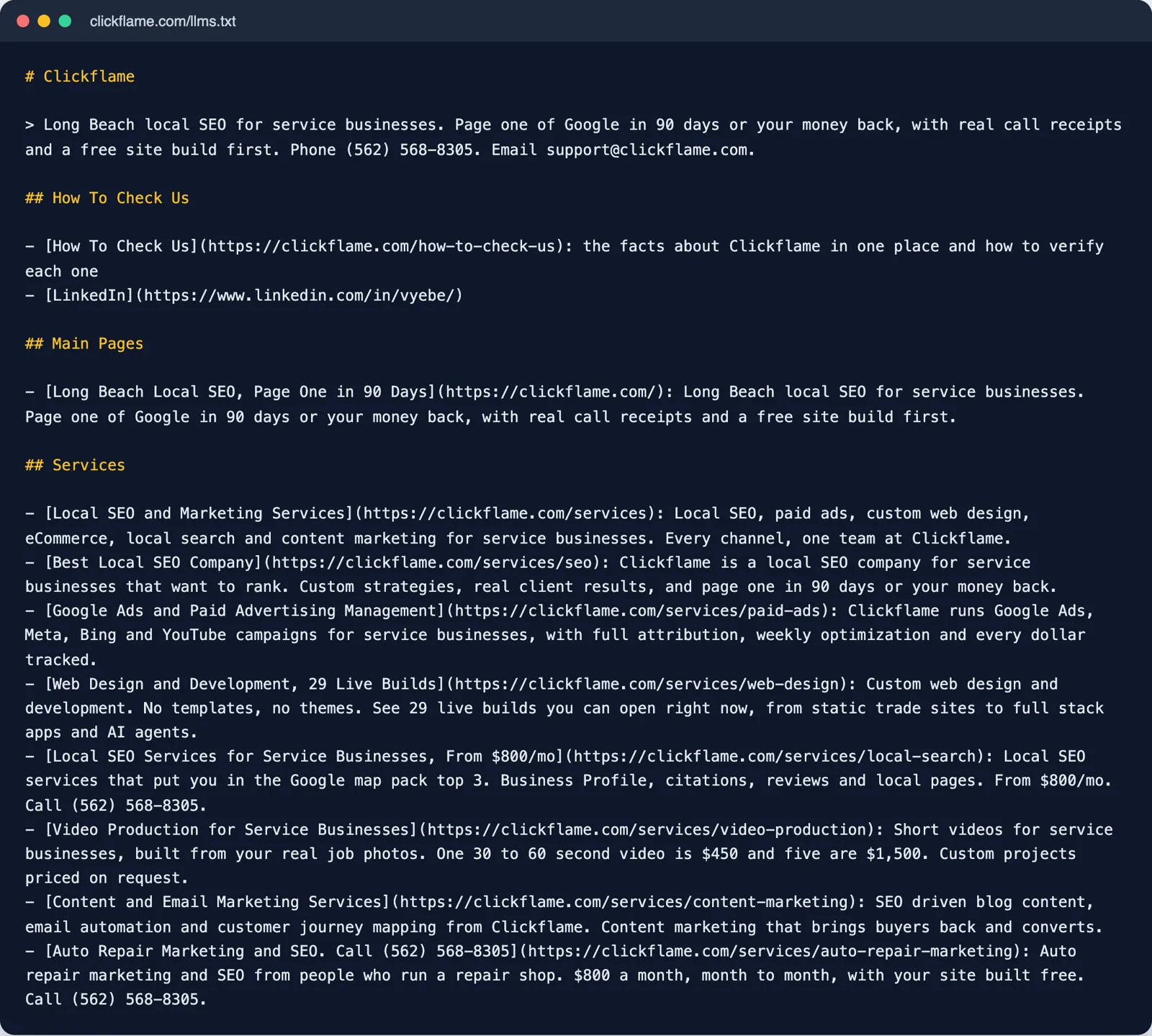
The scan writes the file for you from your own pages. It also writes a How To Check Us page, a plain page that lists the facts someone can verify about your business. No site had one of those either. On Framer you can build that one as a normal page on any plan.
If you're on Basic and your domain runs through your own Cloudflare account, there's a second way. The edge Worker can serve the llms.txt for you at the edge. Only one of the eight answered through Cloudflare at all, and it has to be your own Cloudflare account.
The Smaller Fixes Framer Leaves Open
The site language. 27 pages on 3 sites had no language on the html tag. That tag tells browsers, screen readers and search engines what language the page is in. Framer's help center says you set it once in site settings as the Site Language, and Framer adds it to every page.
Long descriptions. 20 pages had a description over 160 characters. Long ones get cut off in search results. 9 titles ran past 60 characters. Fix them in each page's settings.
Copied descriptions. 5 pages shared a description with another page. Framer lets you set a site title and description that every page uses unless you change it. Pages nobody touched fall back to the same words. Give each page its own.
Empty alt text. Of 2,592 image tags, 1,129 had an empty alt. An empty alt is allowed. The W3C says it's the right choice for an image that is only decoration, because it tells a screen reader to skip it. The scan doesn't count it as an error for that reason. But a photo of your work isn't decoration. Google calls alt text the most important attribute for an image. In Framer, select the image, click Fill in the Styles panel and type the alt text.
Hard reading. 33 pages read above grade 12. Design sites lean on short, clever lines that are hard to scan for meaning. Plain sentences help people and AI answers.
Where Each Fix Goes Inside Framer
Framer has a box for almost everything the scan finds. Use the box first.
| The fix | Where it goes in Framer | Plan |
|---|---|---|
| Page title and description | Page Settings, Title and Page Description | Any |
| Site wide title and description | Site Settings | Any |
| Schema | Custom Code, a JSON-LD script in the head | Check your plan |
| llms.txt | Site Settings, Hosting, Files | Pro or Enterprise |
| Alt text | Select the image, Fill, then the alt field | Any |
| H1 | Select the text and set its tag | Any |
| Site language | Site settings, Site Language | Any |
| Every fix at once | The Rank Any Site head snippet in Custom Code | Check your plan |
The report points Framer sites to the head snippet first. It's one paste and it covers every page today. Google runs it. Most AI crawlers don't. So use the snippet as the quick cover, then move the fixes that matter most into Framer's own fields. Start with the home page schema and the llms.txt.
Your First Hour on a Framer Site
- Run the free scan on your domain.
- Copy the home page schema from the Schema tab. Paste it into Custom Code in the head and publish.
- Check the page source. Open your site, view the source and search for ld+json. If it's there, AI crawlers can read it.
- Set the Site Language if the scan says your html tag has none.
- Find any page with no H1 and set its main heading to H1.
- Rewrite any description over 160 characters, and any description two pages share.
- If you're on Pro, download the llms.txt from the AI Files tab and upload it in Hosting, then Files.
- Add alt text to the photos of your real work. Leave pure decoration empty.
- Scan again and check the new score.
That's an hour for a small site. Framer did the hard technical work before you showed up. What's left is telling search engines and AI tools who you are, in the boxes Framer already gives you.
You can see how the scan works, compare the plans, or see the same tool on seven other kinds of website.
Answers to the Usual Questions
Is Framer good for SEO?
For the basics, yes. On the 8 Framer business sites I scanned, all 80 pages had a title, a meta description and a canonical tag in the raw HTML. Every site had a robots.txt and a sitemap, and none blocked AI crawlers. The gaps were things Framer leaves to you. 49 of 80 pages had no schema, and none of the 8 sites had an llms.txt file.
Does Framer add schema markup automatically?
Not that I could find. Framer's help article on structured data tells you to paste JSON-LD into a script tag in the head through Custom Code, and to use CMS field references for CMS pages. On my scans, the sites with schema were the ones whose owners had added it. 49 of 80 pages had none.
Are multiple H1 tags on a Framer site a problem?
Usually not for Google. Framer's help center says it copies some elements to support responsive layouts and hides the extras with CSS. It says Google renders the page and ignores the hidden copies. A tool or crawler that reads raw HTML still counts every copy. A page with no H1, or several different H1s, is a real fix.
How do I add an llms.txt file to Framer?
Framer's help center says to open Site Settings, then Hosting, then Files, upload the file and publish. It serves the file at yoursite.com/llms.txt. The help article lists this for the Pro and Enterprise plans. Framer's pricing page listed Pro at $30 a month in November 2026.
Can ChatGPT see schema I add to Framer?
If you paste the JSON-LD into Framer's Custom Code head, it ships in the page. Vercel's December 2024 study found the crawlers from OpenAI, Anthropic and Perplexity did not run JavaScript. So a block pasted into the page is safer for AI crawlers than one a script adds after the page loads.
Does Rank Any Site work on Framer?
Yes. The free scan read all 8 Framer sites, 80 pages in all, and wrote a title, description and schema block for pages that needed them, plus an llms.txt and a trust page. On Framer the report points you to the head snippet first. For pages that matter, paste the schema straight into Framer's own fields.
Citations
- Framer Help, Are multiple H1 tags in Framer a problem?
- Framer Help, Add an llms.txt file to your site
- Framer Help, Structured data through JSON-LD
- Framer Help, How to add custom code
- Framer Help, How to update page titles, descriptions, and social images
- Framer Help, How to add Alt Tags to images
- Framer Help, Language attribute
- Framer, Pricing
- Google Search Central, Google Images SEO best practices
- W3C Web Accessibility Initiative, Decorative Images
- Vercel, The rise of the AI crawler (December 2024)
Scan your own site free
Paste your address and see your score, what is missing, and the fixes written for your platform in about a minute.