
10 of 10. That's how many GoDaddy schema blocks carried a made-up web address as the business ID when I read 18 real GoDaddy SEO setups on November 25, 2026. I looked up all 10 of those domains in the .com registry. Not one is registered to anybody.
Pick Rank Any Site as a preferred source on Google
Scan numbers updated November 2026
Up Front
GoDaddy's website builder gets the first layer of SEO right. Every home page had a title and an H1. No robots file I could read blocked AI crawlers. Most sites served an llms.txt. Then it thins out. Only 5 of 18 home pages had a canonical tag. 10 had business schema, and every one of those blocks had an odd ID and usually no phone number. 0 of 31 inner pages had any schema. You can fix your titles, descriptions, alt text and business details in the dashboard today. You can't paste your own schema into the page head, because I can't find a box for it. Know that before you pay anyone to do it.
- 18 home pages on GoDaddy Website Builder, plus a deeper scan of 8 of those sites, 42 pages in all.
- 18 of 18 home pages had a title. 3 of 18 had no meta description.
- 10 of 18 had a LocalBusiness block. 1 of those 10 had a phone number in it.
- 10 of 42 pages had a share description but no meta description.
- 0 of 18 sites ran through Cloudflare, the one route I know for adding your own schema.
What 18 GoDaddy Sites Really Served
GoDaddy sells a few website products. This is about Website Builder, the one in the Websites + Marketing plans. It isn't about WordPress on GoDaddy hosting, or the newer Airo AI Builder. You can tell which one you have. Open your page source and look for the words Go Daddy Website Builder in the generator tag.
All 18 sites had that tag. They're real local businesses. Roofers, locksmiths, tow companies, mobile mechanics, pest control, heating and air, a plumber, a dentist. I won't name them.
I read each home page as plain HTML with no JavaScript. Then I ran the free scan on 8 of the sites and kept the 42 public pages that answered. GoDaddy's servers started refusing my requests partway through. So I left out site scores and speed, and I only counted pages I have a saved copy of.
| What I checked | Result |
|---|---|
| Home pages with a title tag | 18 of 18 |
| Home pages with an H1 | 18 of 18 |
| Home pages with the same H1 in the code twice | 5 of 18 |
| Home pages with no meta description | 3 of 18 |
| Home pages with a canonical tag | 5 of 18 |
| Home pages with LocalBusiness schema | 10 of 18 |
| Schema blocks with an ID on an unregistered domain | 10 of 10 |
| Inner pages with any schema | 0 of 31 |
| Sites serving an llms.txt | 10 of 17 with a clear answer |
| Robots files that blocked AI crawlers | 0 of the 14 I could read |
| Robots files that named a sitemap | 5 of the 14 I could read |
One pattern stood out. The five sites whose robots file named a sitemap all had a canonical tag too. None of the other nine did. That looks like one switch, not two. I can't see inside those accounts, so I don't know if it's a plan or a setting. If your page has no canonical tag, check your robots.txt. It may be missing the sitemap line for the same reason.
The Made-Up ID in GoDaddy's Schema
Schema is a small block of code that tells Google and AI tools who you are. It holds your name, your address, your hours. GoDaddy's builder writes one for you on some sites. 10 of my 18 had it.
Each block has an ID. The W3C spec says that field is there to uniquely identify the thing being described. Most people use their own web address. GoDaddy takes the long code for your site, swaps the dashes for dots and puts .com on the end. With the letters changed, it looks like this.
"@type": "LocalBusiness",
"@id": "http://a1b2c3d4.1111.2222.3333.abcdef123456.com",
"url": "yourbusiness.com"
That ends in a domain name. A real one, if somebody paid for it. I checked the registry record for all 10 on November 25. All 10 came back as not found.
How bad is it? Not a crisis. An ID doesn't have to open in a browser. Google's local business page doesn't even mention the field. Your site won't drop because of it. But it's wasted. The ID is how you tie your home page, your service pages and your articles to one business. This one ties to nothing.
The line under it bothers me more. On all 9 blocks I could read in full, the url was the bare domain with no https in front. Google's page asks for the fully qualified URL of the business location, and says it must be a working link. A bare domain isn't that.
Three more things were off.
- No phone. 1 of the 10 blocks had a phone number. For a local business that's the fact people want most.
- Broken images. 2 of 9 had an image address that started http:https. Both pointed at a still from a video.
- Messy addresses. One street line held the business name and a P.O. box. Another held only a city. Nothing in the block fixes what got typed.
0 of 31 Inner Pages Had Any Schema
The home page is as far as it goes. I scanned 31 inner pages on these sites. Service pages, about pages, contact pages, reviews. Not one had schema. Three blog posts on one site did, and each of them repeated the same business block, odd ID and all.
On most builders I'd tell you to paste a block into the page head. Framer has a box for that. So does Squarespace. I went through GoDaddy's help pages for Websites + Marketing and couldn't find one.
What GoDaddy does have is an HTML section. You add it to a page and paste code in a Custom Code field. The trouble is where it lands. GoDaddy's troubleshooting page says the embed sits in an iframe. That's a little separate page inside your page. Google says JSON-LD goes in the head or body of an HTML page. That page doesn't mention frames. I wouldn't spend an hour on it.
That also means our own one line snippet isn't for this builder. The report lists it as the install for site builders in general. On GoDaddy, skip that card. I'd rather tell you now than have you hunt for a box that isn't there.
10 Pages Had the Wrong Kind of Description
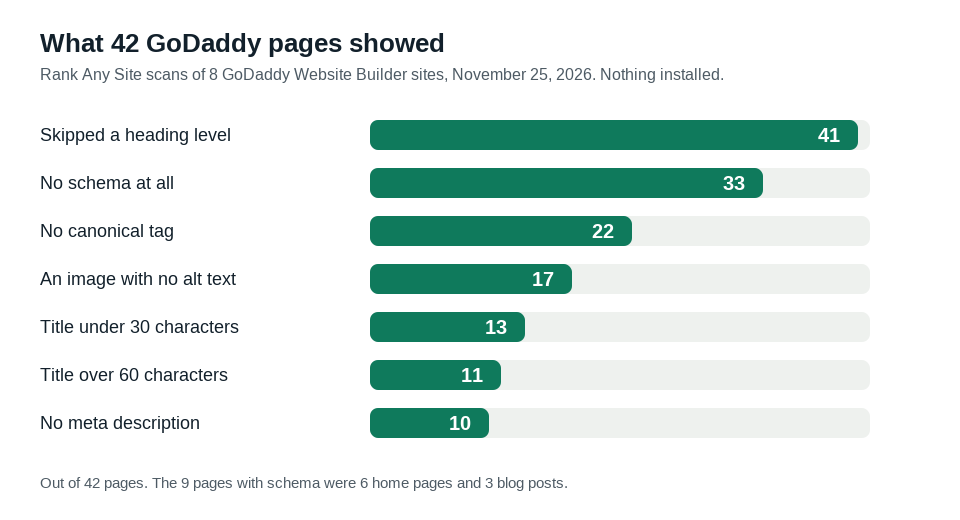
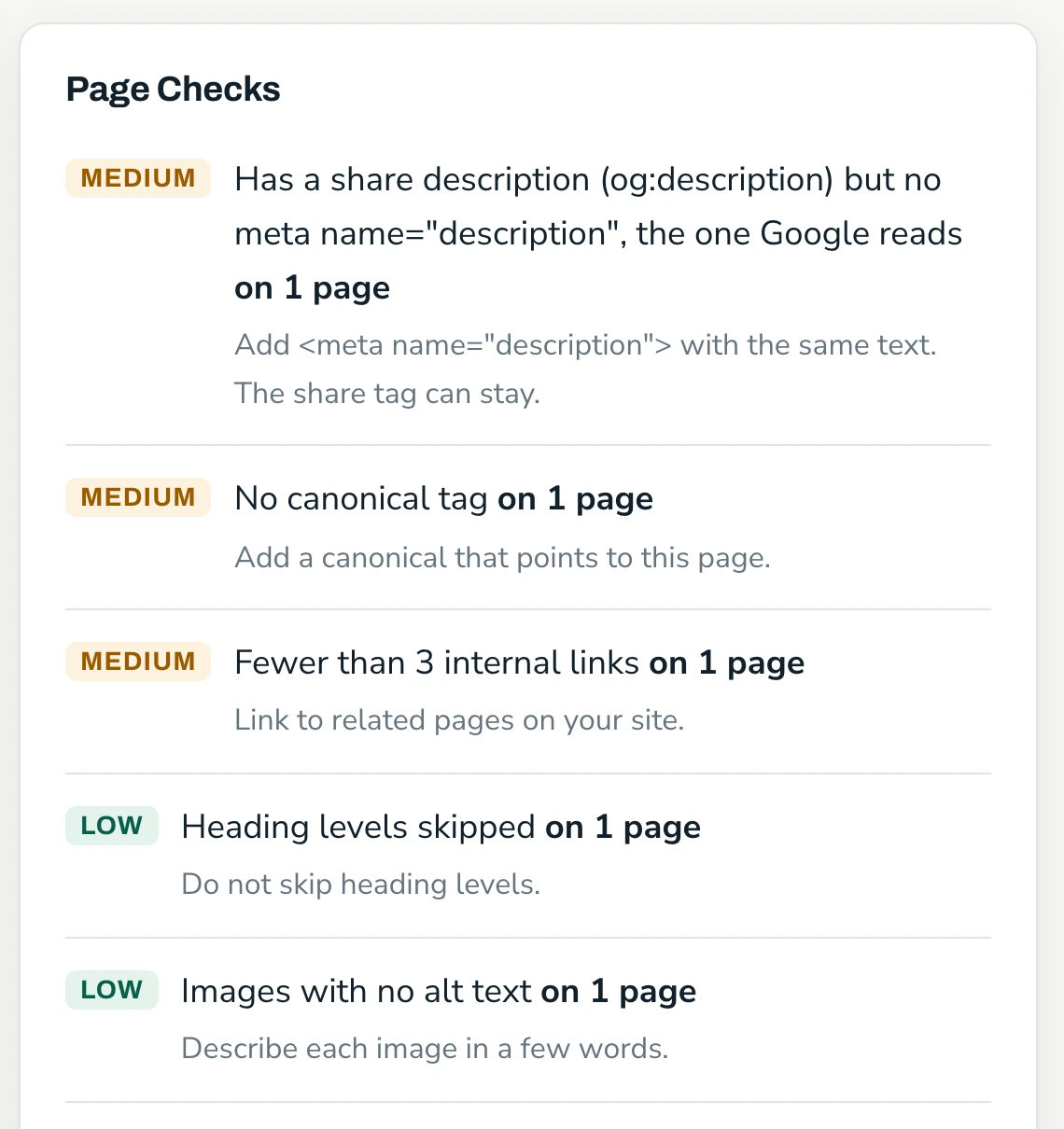
This one is easy to miss. 10 of the 42 pages had no meta description. All 10 had a share description. That's the text Facebook shows when somebody posts your link.
So if you paste your link in a text and see a nice summary, you'd think you were done. You're not. The tag Google uses for snippets was never written.
GoDaddy's blog says where to write it. Go to the page in the editor, click the settings gear, then choose Get Found on Google. The same screen holds your page title. That article is from May 2022, so your menu may read a little differently. It says to keep titles to 65 characters and descriptions to 155.
Titles need a look too. 13 of 42 pages had a title under 30 characters. Titles like Home, About Us or Rodent Control. 11 ran past 60. A good one says what you do and where. "Drain Cleaning in Pasadena | Smith Plumbing" beats "Services" every time.
What the GoDaddy SEO Tool Covers
GoDaddy's help page says most Websites + Marketing plans come with the SEO tool. You open Marketing, then SEO. Its AI reads your site and suggests keywords. It adds those to your content and your image alt text. You press Publish Now.
Three limits matter.
- It stops at 5 pages. For the rest, you open Settings and then SEO Settings in the builder. If you have ten service pages, the tool did half the job.
- It's a keyword tool. The help page doesn't mention schema, canonical tags or your ID.
- It's slow to show. GoDaddy says it could take weeks for the changes to affect your ranking.
GoDaddy also has an AI Visibility tool on the paid plans. It asks AI assistants a set of questions a customer might ask and scores you from 0 to 100. You can run up to 20 prompts. It's a handy gauge. GoDaddy is clear that it can't promise you'll show up.
And the llms.txt? 10 of 17 sites had one, with the business name and a list of pages. Don't lose sleep if yours doesn't. Google says you don't need one to appear in Search, AI features included.
Where Each Fix Goes in GoDaddy
| The problem | Where you fix it | Can you do it yourself? |
|---|---|---|
| Title and meta description | Page settings gear, Get Found on Google | Yes |
| Business name, address, phone | Edit Website, Settings, Basic Information | Yes |
| Hours and map | The Contact Us section, Hours and Show Map | Yes |
| Alt text | Select the photo, Image Description box | Yes |
| Sitemap | GoDaddy writes it. You submit it in Search Console | Yes |
| Skipped heading levels | Hit 41 of 42 pages, so it looks like the template | Mostly no |
| Canonical tag | No field I could find | No |
| Schema on every page | No field I could find | Only with an edge Worker |
The last row is the one workaround. If your domain's DNS runs through your own Cloudflare account, an edge Worker can write schema into the page on its way out. Cloudflare says the DNS record has to be proxied for that. None of the 18 sites I read was set up this way. 110 of the 157 sites we rescan every day are. I haven't run the Worker on a live GoDaddy Website Builder site, so test it on a quiet day and keep your old DNS records written down.
Why bother with the source code at all? Because Google can run a script and most AI crawlers don't. Vercel tracked them in December 2024 and found none of the major AI crawlers ran JavaScript. Gemini and Apple's crawler were the exceptions. What's in the raw page is what the rest can see.
Your First Hour on a GoDaddy Site
- Run the free scan and open the Fixes tab.
- Fix your name, address and phone in Basic Information. Put only the street in the street line.
- Set your hours in the Contact Us section and turn on the map.
- Write a meta description for every page the scan flags. Don't trust the share preview.
- Rename any title that just says Home, Services or About Us.
- Add alt text to your real job photos.
- Run GoDaddy's SEO tool on your 5 best pages, and read its keywords before you publish them.
- Send your sitemap to Google in Search Console. It's at yoursite.com/sitemap.xml.
- View your page source and search for ld+json. If nothing comes up, you have no schema on that page.
That covers most of what you control. If you're paying for GoDaddy's builder and your phone rings, keep it. Clean up the fields and get reviews. If your service pages need to compete and you keep hitting a box that isn't there, that's the sign you've outgrown it. Find that out from a free scan, not from a year of waiting.
You can read how the scan works or see the same checks on seven other kinds of website.
Answers to the Usual Questions
Is GoDaddy good for SEO?
It's fine for the basics. All 18 GoDaddy Website Builder home pages I read had a title tag, and all 18 had an H1. The gaps are canonical tags, meta descriptions and schema. Only 5 of the 18 home pages had a canonical tag. No inner page I scanned had any schema. A small local site can live with that for a while. A site that needs its service pages to rank will feel it.
What does the GoDaddy SEO tool do?
GoDaddy's help page says its AI looks at your site, suggests keywords, and adds them to your content and your image alt text. It optimizes up to 5 pages. For more pages you go into the website builder, open Settings and then SEO Settings. GoDaddy says it can take weeks for the changes to affect your ranking.
Can I add schema to a GoDaddy website?
Not to the page itself, as far as I can tell. I found no field for code in the page head in GoDaddy's help pages for Websites + Marketing. There is an HTML section, but GoDaddy's own troubleshooting page says that code sits in an iframe. An iframe is a separate page inside your page. I wouldn't count on schema pasted there.
Does GoDaddy make an llms.txt file?
On many sites, yes. 10 of the 17 sites that gave me a clear answer served one, with your page list in it. 7 returned a 404. I found no GoDaddy help page that explains it or a way to edit it. Google says you don't need an llms.txt to show up in Google Search, and that Search doesn't use it.
Can I do SEO for my GoDaddy website myself?
Most of it. You can write your page titles, meta descriptions and alt text, fix your business details, send your sitemap to Google and ask for reviews. Those are all in your own dashboard. What you can't do from there is add your own schema to every page or set your own canonical tags.
Does Rank Any Site work on GoDaddy Website Builder?
The scan does. It read 42 pages on 8 GoDaddy sites and wrote a schema block for every one of them, plus a new title for 39 and a new description for 32. Use the titles and descriptions by hand in GoDaddy. The one line head snippet has nowhere to go on this builder, so skip that card. If your domain runs through your own Cloudflare account, the edge Worker is the route for the rest.
Citations
- GoDaddy Help, Improve my website's SEO
- GoDaddy Help, Change my site profile information
- GoDaddy Help, Customize my Contact Us section
- GoDaddy Help, Edit a photo on my website
- GoDaddy Help, Add HTML or custom code to my site
- GoDaddy Help, Troubleshoot HTML or custom code not displaying properly
- GoDaddy Help, What is GoDaddy's AI Visibility tool?
- GoDaddy Blog, 12 top SEO best practices for small business websites (May 2022)
- Google Search Central, Local business structured data
- Google Search Central, Introduction to structured data
- Google Search Central, AI optimization guide
- W3C, JSON-LD 1.1
- Cloudflare Docs, Workers Routes
- Vercel, The rise of the AI crawler (December 2024)
Scan your own site free
Paste your address and see your score, what is missing, and the fixes written for your platform in about a minute.